Page 1 of 2
create series
Posted: Tue Jul 24, 2012 1:35 pm
by martingale
Hi
I use EViews 7.
I have tried without success to write a little program which creates series for standardized unexpected earnings (SUE). I have quarterly data for earnings per share(EPS) for 25 companies put together to a group called OBXEPS12AAR.
I try to use the following equation:
SUE=(EPS-EPS(-4))/(MOVSTDEV(EPS,4))
I need to make a program somewhat like:
For %i
series SUE=(EPS-EPS(-4))/(MOVSTDEV(EPS,4))
next
I haven't programmed before and I can't work the details out.
I 'd appreciate very much if anybody could come up with an example or suggestion or reference?
Re: create series
Posted: Tue Jul 24, 2012 1:54 pm
by EViews Gareth
I'm not entirely sure what you are asking - or rather what you're trying to achieve.
The equation you wrote looks like it will correctly calculate SUE. What is going wrong?
Your for loop doesn't appear to have any reference to !i inside it. What are you looping over?
Re: create series
Posted: Wed Jul 25, 2012 1:02 am
by martingale
Hi and thanx for the answer.
I have made a group which has data(earnings per share) for 25 companies(the data is in 25 columns, one column for each company). I want to use a program rutine to calculate SUE for the 25 companies but I don't know how to write such a program. What I would like to achieve is to automate the process in stead of doing the same calculation 25 times.
Re: create series
Posted: Wed Jul 25, 2012 8:43 am
by EViews Gareth
Code: Select all
For %i =1 to OBXEPS12AAR.@count
%name = obxeps12aar.@seriesname(!i)
%newname = "SUE_" + %name
series {%newname}=({%name}-{%name}(-4))/(MOVSTDEV({%name},4))
next
Re: create series
Posted: Wed Jul 25, 2012 11:37 am
by martingale
hi and thanx a lot, when I run the program I get the message "!i is not defined" (I uploaded the file in case)
Re: create series
Posted: Wed Jul 25, 2012 12:33 pm
by EViews Glenn
The first line should read
not "%i".
create series
Posted: Wed Jul 25, 2012 12:43 pm
by EViews Gareth
My bad.
Re: create series
Posted: Wed Jul 25, 2012 1:06 pm
by martingale
Code: Select all
For !i =1 to OBXEPS12AAR.@count
%name = obxeps12aar.@seriesname(!i)
%newname = "SUE_" + %name
series {%newname}=({%name}-{%name}(-4))/(@MOVSTDEV({%name},4))
next
Thanx very very much Gareth and Glenn, the above code works!
Is there also a way to substitute observations with value 0 to "NA"? this is because the program halts when it come across 0's.
Re: create series
Posted: Wed Jul 25, 2012 2:12 pm
by EViews Glenn
It shouldn't stop, it should just produce a message saying that NAs have been generated and continue ("Division by zero. Missing data generated"). The final series should already contain what you want.
Re: create series
Posted: Thu Jul 26, 2012 2:25 am
by martingale
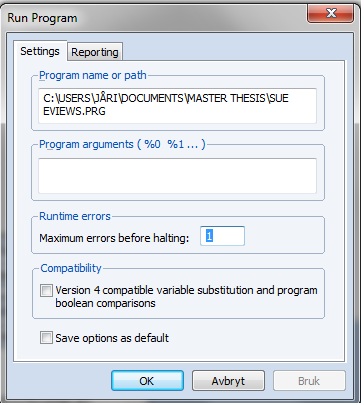
- Program halts EViews.jpg (49.83 KiB) Viewed 14832 times
The program halts at the first series "sue_n_fro_eps_" where the error message is generated. A solution is to increase maximum errors before halting but it might ignore sources of other types of errors. A better solution is to program a subistitution of 0's with "NA". How could this be done?
Re: create series
Posted: Thu Jul 26, 2012 4:08 am
by martingale
Code: Select all
for !i =1 to OBXEPS12AAR.@count
%name = obxeps12aar.@seriesname(!i)
series {%name}=@recode({%name}=0, NA, -{%name})
next
this code seems to do the trick (substitute 0 with NA), but is it possible to nest it in the first code?
Re: create series
Posted: Thu Jul 26, 2012 11:09 am
by EViews Glenn
By stop, I meant within the one series generation. You are correct that after that series is generated, the program will stop.
I note that your proposed solution modifies the original series which generally makes me nervous.
Moreover, I don't think this modification is really what you want to do. You are replacing all values where the series equals zero with NAs, otherwise you are including the
negative of the original series. Apart from the negative part, which I think is just a mistake, that substitution will solve the problem, but will also modify your @MOVSTDEV results everywhere there is a data 0 in the span, even if the original @MOVSTEDEV result is nonzero. What I think you want to do is to replace the 0's in the resulting moving standard deviation series:
Code: Select all
For !i =1 to OBXEPS12AAR.@count
%name = obxeps12aar.@seriesname(!i)
series stdevtmp = @MOVSTDEV({%name},4)
stdevtmp = @recode(stdevtmp=0, NA, stdevtemp)
%newname = "SUE_" + %name
series {%newname}=({%name}-{%name}(-4))/stdevtemp
delete stdevtemp
next
Note that I don't mind overwriting the STDEVTMP since it's a temporary series.
Re: create series
Posted: Thu Jul 26, 2012 12:16 pm
by martingale
Hi Glenn
Thanx very much for the ansewr. You are right, the negative part was a plain spelling error.
Re: create series
Posted: Thu Jul 26, 2012 1:27 pm
by EViews Glenn
Glad it's working.
As I said, I don't like modifying original data unless I'm sure that's what I want. I almost always generate into a new series. The possibility of error is all the more reason not to overwrite the original series unless you are *absolutely* sure that's what you want to do. Once the data are modified, it may be impossible to "unmodify".
Re: create series
Posted: Fri Jul 27, 2012 3:04 am
by martingale
Code: Select all
For !i =1 to OBXEPS12AAR.@count
%name = obxeps12aar.@seriesname(!i)
series stdevtemp = @MOVSTDEV({%name},4)
stdevtemp = @recode(stdevtemp=0, NA, stdevtemp)
%newname = "SUE_" + %name
series {%newname}=({%name}-{%name}(-4))/stdevtemp
delete stdevtemp
next
Hi Glenn, had to change "tmp" to "temp".
It works now fine like you said.