Page 1 of 1
Koop-Korobilis Priors in BVAR
Posted: Wed Mar 23, 2011 8:03 am
by donihue
Apologies for coming back to this yet again:
Checking through the command-line approach to BVARs, I find that although it now works fine for Prior=0, 1, and 4, by contrast when one sets Prior = 2 or 3, the dialogue box requiring input of various parameters nevertheless pops up, even with a command like "bvar(Prior=2,c,it,h=20,a1=0.5,a2=0.5,a3=0.1) 4 lm2 rl rs ly pi", which as far as I can tell contains all the information necessary. As a result, it is impossible to loop over different models without manual intervention.
If this behaviour could be altered, it would be very helpful.
Regards
Donihue
Re: Koop-Korobilis Priors in BVAR
Posted: Wed Mar 23, 2011 3:03 pm
by EViews Esther
Checking through the command-line approach to BVARs, I find that although it now works fine for Prior=0, 1, and 4, by contrast when one sets Prior = 2 or 3, the dialogue box requiring input of various parameters nevertheless pops up, even with a command like "bvar(Prior=2,c,it,h=20,a1=0.5,a2=0.5,a3=0.1) 4 lm2 rl rs ly pi", which as far as I can tell contains all the information necessary.
Now you can simply say "
bvar(Prior=2) 4 lm2 rl rs ly pi " without having an additional dialog for the hyperparameter specification. As you know, you can always change the hyperparameter values by saying
"
bvar(Prior=2,a1=0.5,a2=0.5,a3=0.1) 4 lm2 rl rs ly pi ".
Re: Koop-Korobilis Priors in BVAR
Posted: Wed Mar 23, 2011 3:54 pm
by donihue
Thanks very much, Esther.
As usual your response was very prompt and helpful.
I have tested the new version for all three forms of command and for both Prior=2 and Prior=3, and all seems to work perfectly.
I am very grateful for your help.
Regards
Donihue
Re: Koop-Korobilis Priors in BVAR (2)
Posted: Thu Mar 24, 2011 5:33 am
by donihue
Hello Esther,
I am truly sorry to return to this matter, but I am afraid I replied too hastily yesterday when saying that all worked well. Then, I tested only the "default" specification, with a1=0.5. However, today I have been trying to loop through various models with a1 ranging from 0.1 to 0.9, and find that (although the GUI works) the command line option does not seem to pick up the changes: it continually returns the default model, rather than the one with changed parameters. I have confirmed this behaviour by changing the default values in "bvar.prg" and find them repeated also. I have looked through "bvar.prg" to find the cause, but cannot myself see immediately what is causing this behaviour. Do you think you could possibly check it again to be sure that the parameters are indeed passed through to the estimation phase?
Many thanks
Regards
Donihue
Re: Koop-Korobilis Priors in BVAR (3)
Posted: Thu Mar 24, 2011 6:39 am
by donihue
Further to my previous posting, I think I may have found the problem: there seems to be an inconsistency in "bvar.prg" in the specification of the parameters for the "koko" model:
- in line 306, in the call to "koko", they are specified as %a1, %a2 and %a3
- this is also the case for line 383 when building the output file
- however, in lines 140, 144 and 149, where they seem to be read in from the command, they are specified as %lambda1, %lambda2 and %lambda3
Hence, the parameters passed to "koko" seem to be those specified by default in lines 27, 28 and 29, rather than those specified on the command line
Hope this helps.
Regards
Donihue
Re: Koop-Korobilis Priors in BVAR
Posted: Mon Mar 28, 2011 10:06 am
by EViews Esther
I fix the bug in the command lines.
I have one additional note for your model comparison.
The hyperparameters in Sims-Zha models can be related to those in Ko-Ko Minnesota model as follows:
a1 = lambda1
a2 = lambda1*lambda2
a3 = (lambda0*lambda4)^2
0 = mu5
0 = mu6
Re: Koop-Korobilis Priors in BVAR
Posted: Tue Mar 29, 2011 2:15 am
by donihue
Hello Esther.
Many thanks for your work on this!
I downloaded and installed the new version of BVAR and also updated my EViews7.1 copy to build of Mar 15 2011, but when I ran Gareth's test programme, I obtained the results appended below. Perhaps the syntax has changed?
Regards
Donihue
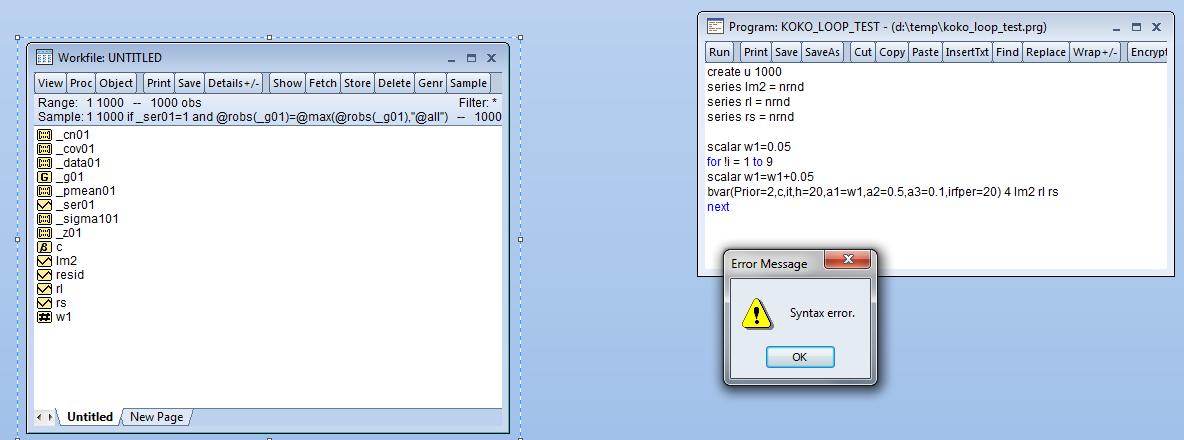
- koko_test.jpg (60.12 KiB) Viewed 21919 times
Re: Koop-Korobilis Priors in BVAR
Posted: Tue Mar 29, 2011 8:12 am
by EViews Esther
Since "a1" is a string (e.g. %a1 = "0.5") just as other hyperparameters ("a2"and "a3") in the command options, we cannot assign a scalar value (bad e.g. %a1 = 0.5).
The problem can be resolved by changing "w1" into a "scalar (e.g. 0.5)" value.
[E.G.]
bvar(prior=2,c,it,h=20,a1=0.5,a2=0.5,a3=0.1,irfper=20) 4 lm2 rl rs
Re: Koop-Korobilis Priors in BVAR
Posted: Tue Mar 29, 2011 10:40 am
by donihue
Thanks, Esther, for your clarification.
You are quite right, but that also seems to defeat the possibility of looping over values of, say, w1, as in Gareth's example, unless I have misunderstood.
That was something I was hoping to be able to do, and seemed to be possible before the latest change (although of course the looping did not then pick up the changes in the parameter ...)
Do you see any possibility of such loops? Is there a way to input loops of the necessary strings, for example? [Sorry - perhaps that question should be addressed to someone else?]
Regards
Donihue
Re: Koop-Korobilis Priors in BVAR
Posted: Tue Mar 29, 2011 10:45 am
by EViews Gareth
%w1 = @str(w1)
Re: Koop-Korobilis Priors in BVAR
Posted: Tue Mar 29, 2011 11:42 am
by donihue
Many thanks, Gareth - so simple!
Regards
Donihue
Re: Koop-Korobilis Priors in BVAR
Posted: Wed Mar 30, 2011 3:13 am
by donihue
One further (hopefully final!) query: where does one find the forecasts generated when the f, it and/or h options are set?
Running Gareth's test programme, I find a line in each model for the "predictive mean", but do not see anything looking like a forecast in the output; perhaps I have missed something?
Code: Select all
create u 1000
series lm2 = nrnd
series rl = nrnd
series rs = nrnd

scalar w1=0.05
for !i = 1 to 9
scalar w1=w1+0.05
%w1 = @str(w1)
bvar(Prior=2,c,f,h=4,a1=%w1,a2=0.5,a3=0.1,irfper=20) 4 lm2 rl rs
next
Regards
Donihue