Page 1 of 1
@makedate and weeks - unexpected error
Posted: Thu Sep 04, 2025 1:54 am
by mamo
Hi, using Eviews 14 Dec 2024 build.
What is wrong with the following command line? Unexpectedly, it produces the error message "Bad date format 'yyyyww' - Missing data generated."
Code: Select all
series x=@makedate(201143, "yyyyww")
Re: @makedate and weeks - unexpected error
Posted: Thu Sep 04, 2025 10:31 am
by EViews Gareth
makedate doesn't support weeks [because a week doesn't identify a date]
Re: @makedate and weeks - unexpected error
Posted: Fri Sep 05, 2025 1:00 am
by mamo
- p1.png (18.47 KiB) Viewed 22652 times
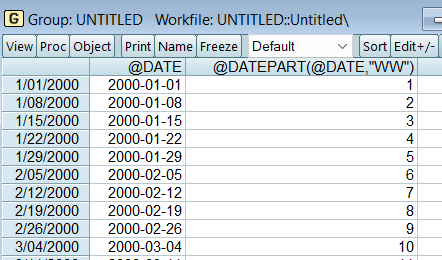
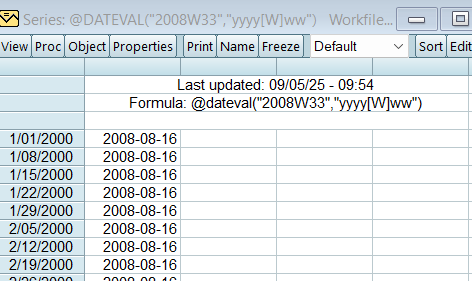
Well, the functions @dateval and @datepart(@date, week) obviously assign 1) a date to a specified week and 2) a week to a specified date, respectively. So there seems to be a uniquely defined link between weeks and dates (as is also the case with months and dates).
So suggestion here. Please make @makedate work also applicable to weeks in future updates of Eviews.
Code: Select all
wfcreate w 2000 2010
show @dateval("2008W33", "yyyy[W]ww")
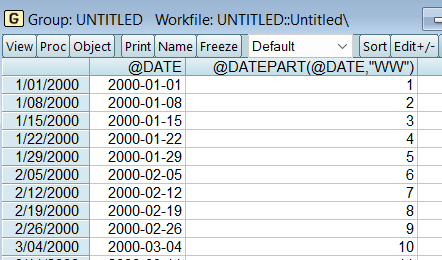
show @date @datepart(@date, "WW")
- p2.png (24.42 KiB) Viewed 22652 times
Re: @makedate and weeks - unexpected error
Posted: Fri Sep 05, 2025 7:50 am
by EViews Gareth
Those two functions are series functions, and so are able to use workfile context to determine the dates that correspond to the weeks (and vice versa). If you create a monthly workfile instead of a weekly workfile, you'll notice that @dateval fails.
@makedate is not a series function and so does not use workfile context.
Re: @makedate and weeks - unexpected error
Posted: Mon Sep 08, 2025 2:37 am
by mamo
Hm, @dateval works fine and as expected with a monthly date as argument in any workfile context.
There seems to be an issue with calendar-week dates in Eviews.
Code: Select all
wfcreate m 2000M01 2010M12
show @dateval("2009M04", "yyyy[M]mm")
Code: Select all
wfcreate u 1
show @dateval("2009M04", "yyyy[M]mm")

- p2.png (3.45 KiB) Viewed 22569 times
- p1.png (18.47 KiB) Viewed 22569 times
Re: @makedate and weeks - unexpected error
Posted: Mon Sep 08, 2025 7:23 am
by EViews Gareth
Right, because months are always defined. Weeks are not a defined concept. There is no defined "Week 1" of a year. That entirely depends on whatever structure the user is using. But January is always the first month of the year.
Re: @makedate and weeks - unexpected error
Posted: Thu Sep 11, 2025 12:05 am
by mamo
So here is a workaround for @makedate with years & weeks as arguments not working:
Assume you have an unordered workfile containing variables indicating year and week of the year, "year" and "week", respectively. In order to generate a proper date series "date" out of "year" and "week" you may use the following command line:
series date=@dateadd(@makedate(year, "yyyy"), week-1, "WW")
See example code below
Best, mamo
Code: Select all
' Create an unordered workfile containing the variables "year" and "week"
wfcreate u 20
series year = 2000+@trend
series week = NA
rndint(week, 51)
week=week+1
sort year week
' create a date series using the variables "year" and "week"
series date=@dateadd(@makedate(year, "yyyy"), week-1, "WW")
' crosscheck
group gr @datepart(date, "WW") week
gr.sheet(c)
Re: @makedate and weeks - unexpected error
Posted: Thu Sep 11, 2025 8:18 am
by EViews Gareth
Whether that will give you what you want or not, depends on how you are defining weeks.