Page 1 of 1
wfcreate
Posted: Tue Jan 21, 2025 12:26 pm
by startz
The command
creates a workfile of type wf1 even when the default is set to wf2.
Re: wfcreate
Posted: Wed Jan 22, 2025 8:29 am
by EViews Steve
WF1 and WF2 file types are determined as the save point. When loaded, the workfile is the same data structure in memory as before.
You can save a workfile in WF1 format, and then save it again in WF2 format.
Re: wfcreate
Posted: Wed Jan 22, 2025 9:03 am
by startz
The point is that the command defaults to setting the save type as wf1. It probably should not. Much as I am personally fond of the wf1 file format, it is rather dated.
Re: wfcreate
Posted: Wed Jan 22, 2025 9:21 am
by EViews Steve
I'm confused. Are you saying the WFCREATE command defaults to WF1?
Our workfile save format default is controlled by a setting under General Options/Data Storage/Workfile Format (WF2):
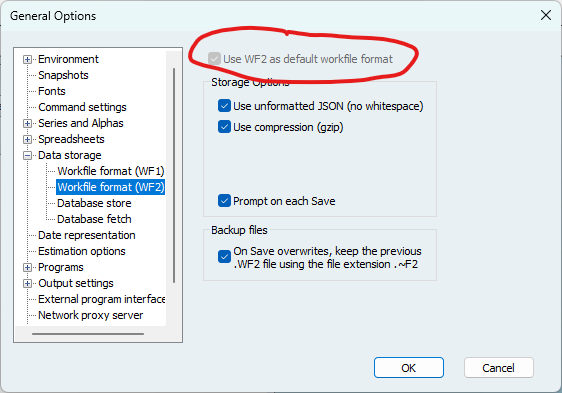
- Screenshot 2025-01-22 081620.png (30.97 KiB) Viewed 68616 times
When you run the WFSAVE command, and you don't specify a file extension, the file is saved using the default workfile format type.
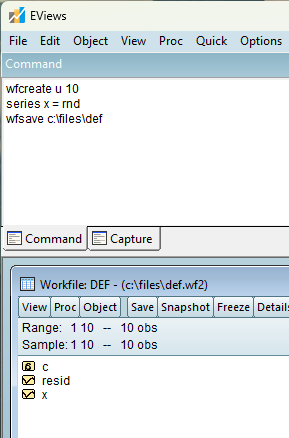
- wfsave.png (16.09 KiB) Viewed 68616 times
And you can overwrite this default by either specifying a file extension or using the "type=wf2" option.
Re: wfcreate
Posted: Wed Jan 22, 2025 9:28 am
by EViews Gareth
I think the issue is, if you do:
It will create a workfile. If you then hit the "Save" button at the top of the workfile window, it will save that workfile as a .wf1 file, not a .wf2 file, even if your defaults are to save as .wf2.
Re: wfcreate
Posted: Wed Jan 22, 2025 9:32 am
by startz
Yes. That is the issue.
Re: wfcreate
Posted: Wed Jan 22, 2025 10:42 am
by EViews Steve
It'll be fixed in next patch.
Re: wfcreate
Posted: Wed Jan 22, 2025 11:02 am
by startz
Thanks.