Page 1 of 1
Excel Add-in
Posted: Wed Oct 30, 2019 12:20 am
by farrel
Dear Eviews,
I have 2 suggestions to improve Excel Add-in for Eviews (I have Eviews 11)
1. Is it possible to import a description of the series along with series name into the EXCEL? Otherwise, once you have hundreds of series, it means series names are coded with short name and it's difficult to understand for other user in EXCEL what these series mean
e.g. it might be imported using the check box "include Description series"

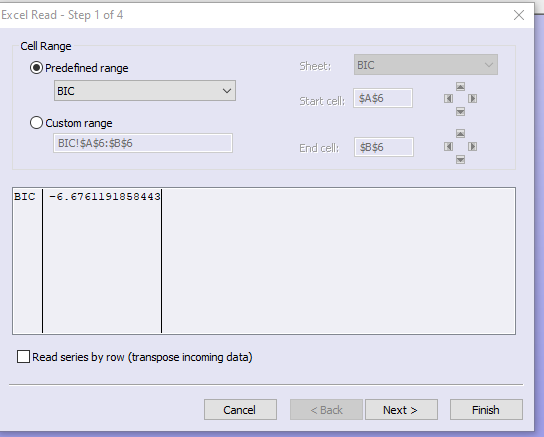
2. Minor issue, is it possible to add horizontal scroll of the import data window, so that user can see a full description of the series?
Picture below - it's not possible to see full description
Thanks
Andrei
Re: Excel Add-in
Posted: Wed Oct 30, 2019 1:58 pm
by EViews Steve
Regarding your first request:
We could potentially include attributes as additional rows at the beginning or at the end of the data rows, but this can confuse Excel as it may decide your column data type based on the first few rows of data which now can be different data types.
Or maybe we could append the description to the series name?
As for your second suggestion:
We can add a horizontal scrollbar. We'll try to do this sometime soon.
Steve
Re: Excel Add-in
Posted: Wed Oct 30, 2019 4:25 pm
by startz
Steve,
Also consider a second sheet that serves as a data dictionary with first column names and second column description. That's a pretty common format.
Re: Excel Add-in
Posted: Mon Nov 04, 2019 3:59 am
by farrel
1/ Ideallly, I would expect a description to appear above the name of the series in the EXCEL (attached pic).
But, unfortunately, I have no clue on compatibility issues with EXCEL data type.
Appending description to the name of the series?! I think that users would prefer to keep names of series separate from description. I believe the Description of the series is very useful feature for end-users, which usually don't care about the names Eviews users exploit in programming...
2/ And one more minor issue - EXCEL Add-in imports ID series as "General format". That's would be nice to set @DATE, e.g. as Excel number category: Date (which sets DATE type to default regional settings of the user).
Re: Excel Add-in
Posted: Mon Nov 04, 2019 4:12 am
by farrel
Steve,
Also consider a second sheet that serves as a data dictionary with first column names and second column description. That's a pretty common format.
This is interesting solution. I suppose the question is - is it possible to automate using EXCEL add-in?!
Thanks
Re: Excel Add-in
Posted: Thu Feb 04, 2021 3:03 pm
by farrel
Dear Eviews,
Would it be a difficult to build additional feature - to import data in rows? Let's say, add some tickmark to "transpose" data...
Currently Add-in import data in columns
Andrejs
Re: Excel Add-in
Posted: Thu Feb 04, 2021 3:12 pm
by startz
Does the checkbox (Open/Foreign data as workfile) at the bottom
- Screenshot 2021-02-04 141050.png (14.65 KiB) Viewed 44684 times
do what you want?
Re: Excel Add-in
Posted: Fri Feb 05, 2021 3:42 am
by farrel
Richard, Are you talking about importing data from excel to Eviews?
If anything, My question relates to importing data from Eviews databases to Excel by means of EXCEL Add-in
Re: Excel Add-in
Posted: Fri Feb 05, 2021 7:09 am
by startz
Sorry, I indeed misunderstood the direction.
Re: Excel Add-in
Posted: Sat Feb 06, 2021 4:07 pm
by EViews Steve
Andrejs:
We looked into this a while back but it turned out to be much more complicated than we thought.
On the Excel side, I don't think it has the ability to directly import from a data source and immediately transpose it before laying it out in a spreadsheet. It can definitely do this as a two-step process though.
On the EViews side, we would have to treat each observation as a separate object and we run into memory concerns and slow performance when we have to start reading a single obs across all objects as the data is usually stored grouped by their object instead of by obs number.
In short, I don't see this happening.
Steve
Re: Excel Add-in
Posted: Mon Feb 08, 2021 1:44 pm
by farrel
I see. Thanks