Page 13 of 16
Re: How to enter data into a panel workfile.
Posted: Tue Jul 14, 2015 4:28 pm
by EViews Gareth
On my phone only, so give gui instructions, but I think the following program will do it:
Code: Select all
wfopen "ulc total 2.xlsx" colhead=2
pagestack num?
rename num ulc
rename var01 year
pagestruct country @date(year)
Re: How to enter data into a panel workfile.
Posted: Tue Oct 13, 2015 2:56 pm
by adnma
Hi!
I have panel data set with 65 firms spread over 5 years (2009-2013)
The issue that I am facing is that I have to test for heteroscedasticity. As no direct test for het. is available I have to convert the panel structured/dated to unstructured so I will be able to run White test.
How do I undertake such conversion in Eviews 8.
Please Help!
Workfile Posted.
Re: How to enter data into a panel workfile.
Posted: Tue Oct 13, 2015 5:33 pm
by EViews Gareth
Just double-click the Range word at the top of the workfile and change the structure to unstructured.
Re: How to enter data into a panel workfile.
Posted: Tue Nov 10, 2015 5:45 am
by BK03
Hi Gareth,
In the example you give below is it possible then to isolate a variable, say history of house prices in Alabama? If you open up the object house prices, the house prices appear for all the states. What if I just wanted to regress house prices in Alabama against the school budget in Alabama? Do I have to go about creating a new variable? If so, how do I do this?
Thanks!
A second type of format that is used in Excel, is where the columns represent dates, then the rows represent both cross-sections and variables. Such is the case in the following:
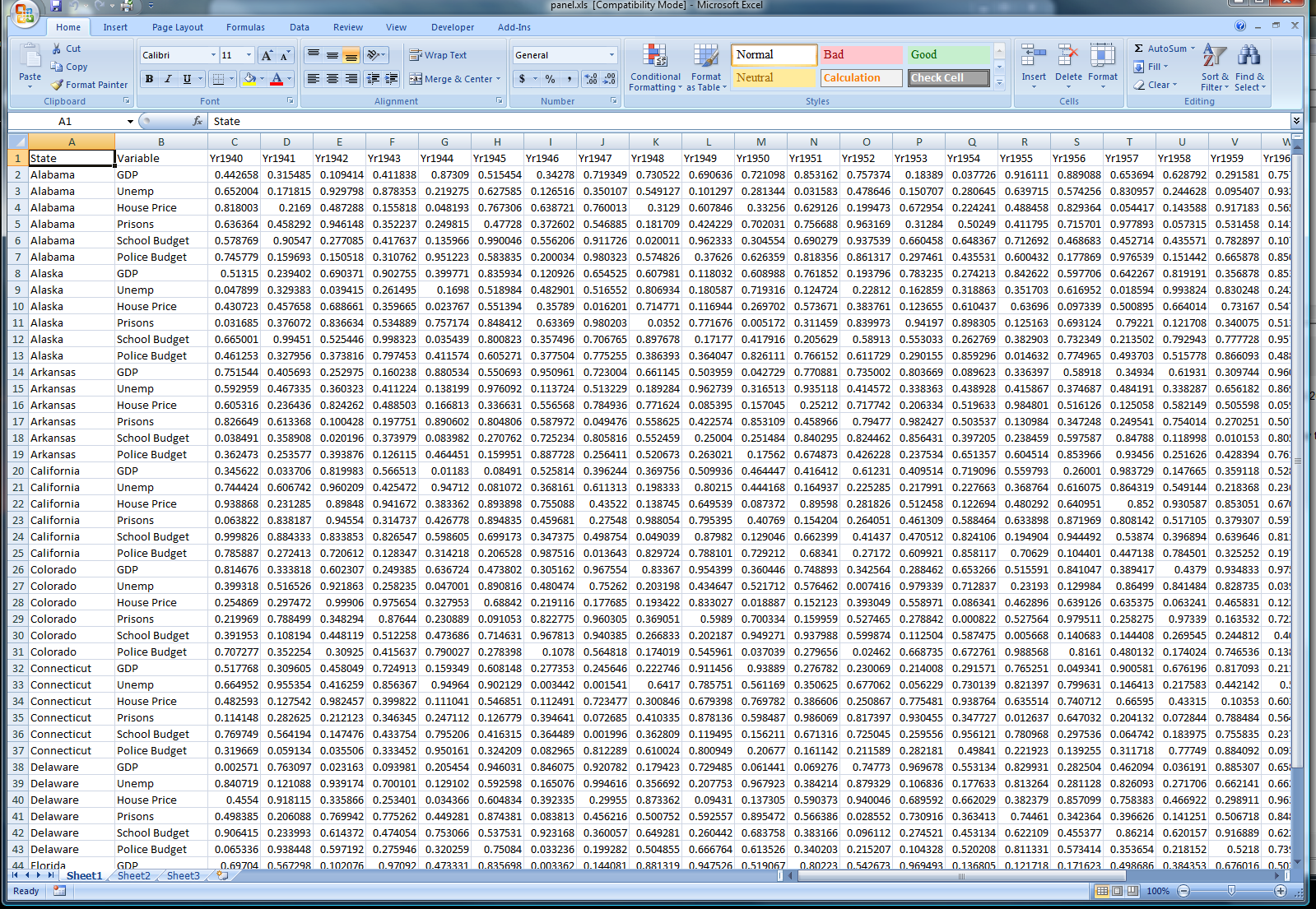
This file can be obtain from
here.
This sort of structure is a little more tricky, and takes a bit more effort inside EViews. If you bring the file in by opening it into EViews, you will get a workfile that looks like this:
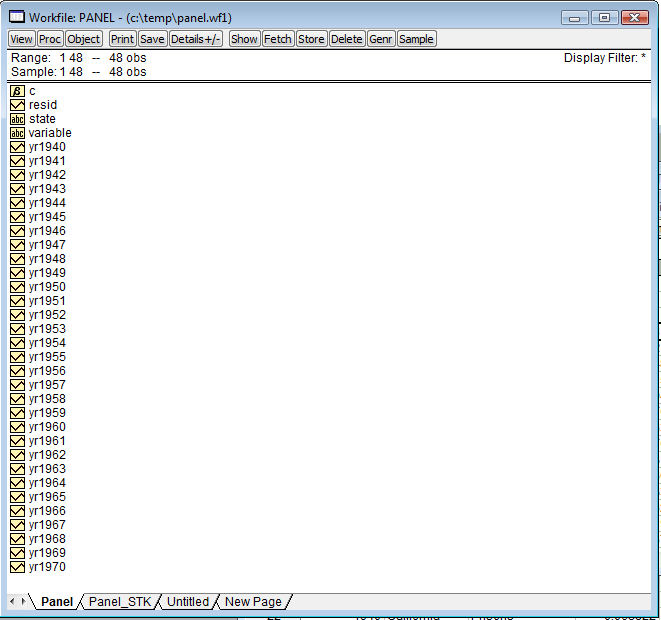
The first thing we need to do is to stack this into a new page:

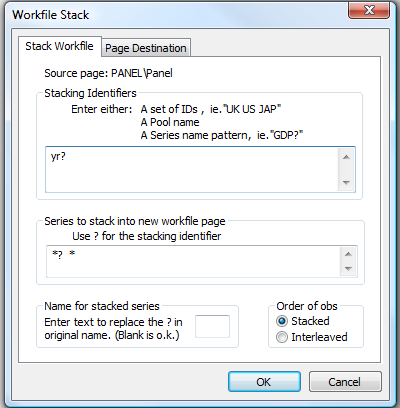
Notice that we use yr? as the stacking identifier since the series in EViews are all named yrXXXX.
The stack results in the following workfile page:
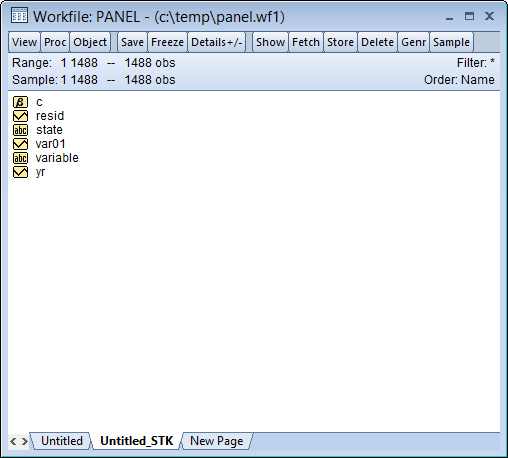
Now we need to unstack this page into a panel. First, though, we need to change our "Variable" series a little. This is because the text inside that variable contains spaces, and we want to create new series from this text, but series names cannot contain spaces. Thus we type the following in the command pane to create a new alpha series containing valid names:
Code: Select all
alpha var2=@replace(variable," ","_")
show var2
d variable
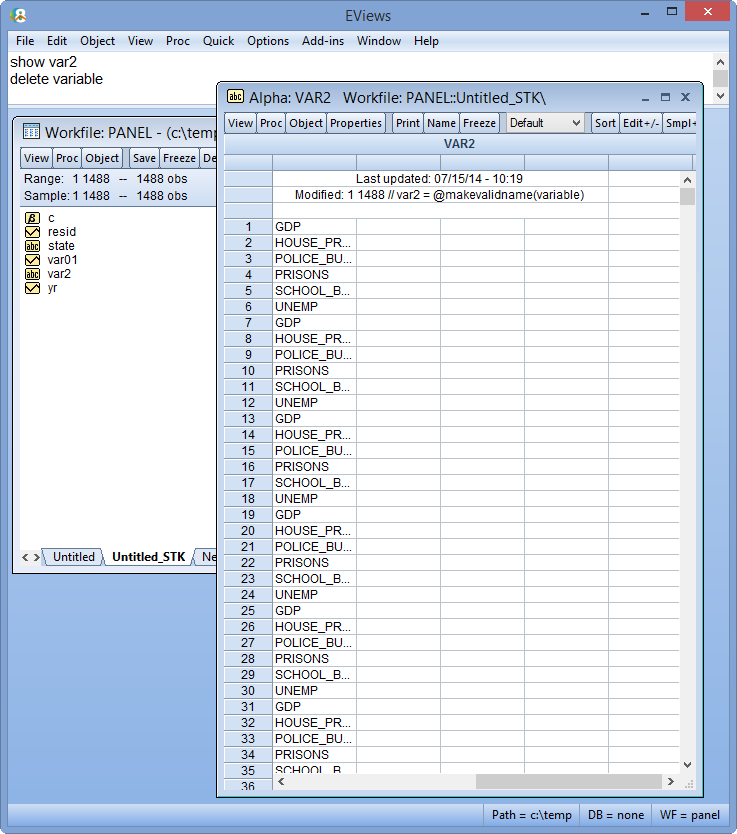
Once this new alpha series has been created, we can do the unstack:
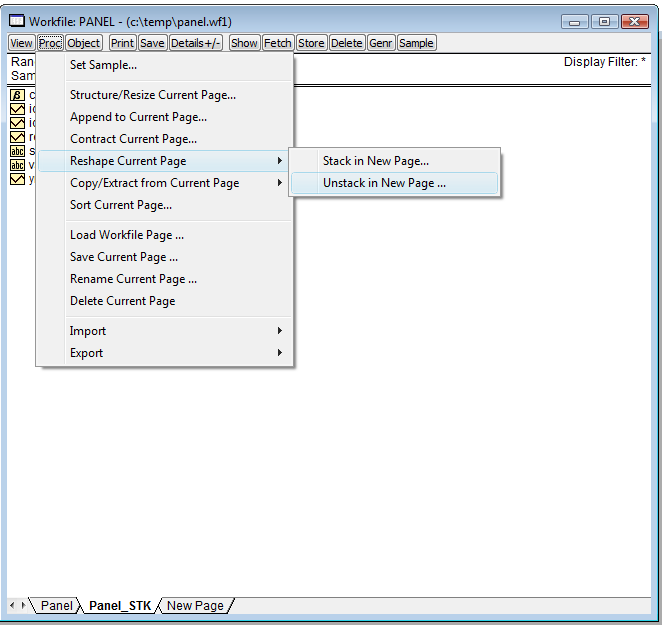
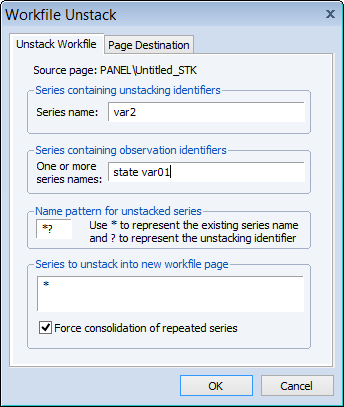
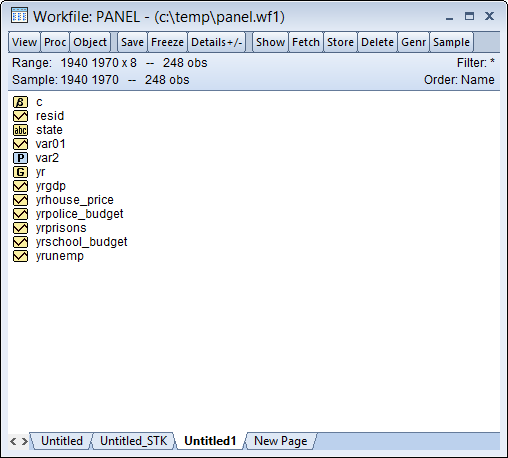
Now we're pretty much done. We just need to type a few more commands to tidy things up a bit (delete some un-needed series and rename some):
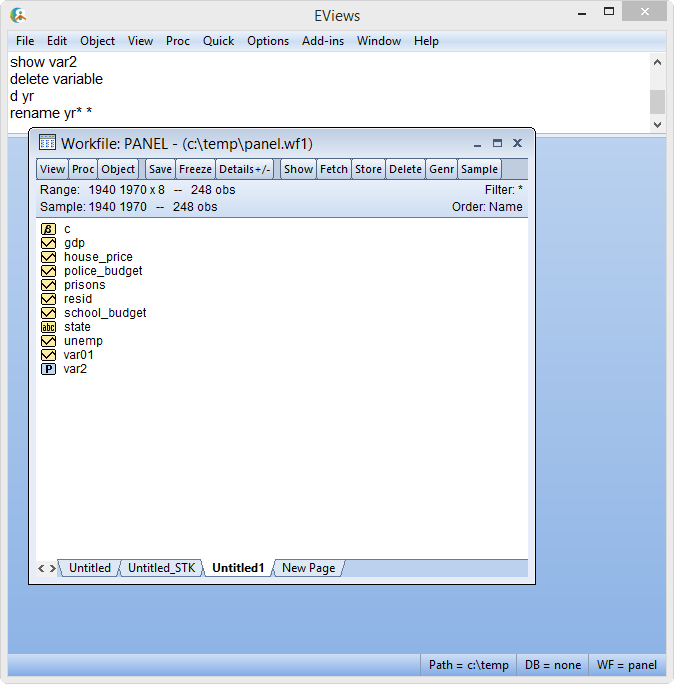
And we're done!
Re: How to enter data into a panel workfile.
Posted: Tue Nov 10, 2015 9:15 am
by EViews Gareth
Hi Gareth,
In the example you give below is it possible then to isolate a variable, say history of house prices in Alabama? If you open up the object house prices, the house prices appear for all the states. What if I just wanted to regress house prices in Alabama against the school budget in Alabama? Do I have to go about creating a new variable? If so, how do I do this?
Thanks!
Just set the sample to be only observations in Alabama.
Re: How to enter data into a panel workfile.
Posted: Tue Nov 10, 2015 12:11 pm
by Olvit
Dear Gareth
sorry for distrubing you, I have started to look through your answers on panel data but was not able to find exmaple which fit my case.
So, i have following excel sample
 http://prntscr.com/91a6lx
and I need to create a panel workfile for 12 pilars as a variables.
Data range is 2007-2015, number of countries 151, number of pillars -12
How should I make it easily?
Thank you for the help in advance
Re: How to enter data into a panel workfile.
Posted: Tue Nov 10, 2015 12:24 pm
by EViews Gareth
Can you provide the Excel file?
Re: How to enter data into a panel workfile.
Posted: Tue Nov 10, 2015 12:27 pm
by Olvit
Can you provide the Excel file?
Yes, I have edited my post and add there excel file
Re: How to enter data into a panel workfile.
Posted: Tue Nov 10, 2015 12:43 pm
by EViews Gareth
Easiest with a brief program:
Code: Select all
wfopen gcr_pillars.xlsx
pillars = "pill_" + pillars
pageunstack pillars  date
pagestack ?pill_1st @ ?* *
pagestruct var01 @date(date)
Re: How to enter data into a panel workfile.
Posted: Tue Nov 10, 2015 1:10 pm
by Olvit
Thank you! it works!!!!!
Re: How to enter data into a panel workfile.
Posted: Mon Mar 14, 2016 4:47 am
by totomkos
Dear All,
As I new in eviews I would really need your help. I have dividend data for several companies for several years and many idependent variables some of which are dummies. I want to import the to eviews from excel.
Some specifiactions: I have observations from 8 years and about 500 companies that have more than one observation-dividend for each each year. This means that i havenot the same observations between companies and years. addtionally, some of my explantory variables are dummies related to nationality gender etc.
I follow your threads but I fail... additionally i try to attach you a excel file or wfi (the extension is not allowed) but I cannot, I do not know why?
Is it possilbe to guide me?
Thank a lot
totomkos
Re: How to enter data into a panel workfile.
Posted: Mon Mar 14, 2016 8:46 am
by EViews Gareth
Which column is the time dimension and which column is the cross-section dimension?
Re: How to enter data into a panel workfile.
Posted: Tue May 17, 2016 4:43 am
by alper
Hello Gareth
I tried to form a balanced panel file for quarterly period 2011-2015 (years column) and 20 cross sections İD (firm Column) with VALUE (dependent variable, log value of firms' Daily price change), VALUATION (explanatory variable, log value of firms assets valuation difference), CURRENCY (explanatory -control- variable , log value of FX difference), CAP (explanatory-control- variable, log value of firms Capitalization).
However when I tried to create a new wf by openning a foreign file and picked "dated panel" I had an error message: "repeated values found in source ID series". I then created an unstructred and unbalanced file. Secondly, I picked "Proc/"structured/resize.." to transform existing file into dated panel. I received those following message:
"indicies do not uniquely identity observation. 20 dublicate date(s) found. create ID series to identify observation" I answered yes.
Then "Adding cellid as inner index will create a 3 dimension unbalanced undated panel. Are you sure you wish to continue?" I answered yes again to get the final wf.
My original excel file and eviews excel file are attached. What could be the problem to construct a balanced panel
Thank you in advance
Re: How to enter data into a panel workfile.
Posted: Tue May 17, 2016 6:47 am
by EViews Gareth
Check the dates carefully in the source Excel file.
Re: How to enter data into a panel workfile.
Posted: Wed May 18, 2016 12:23 am
by alper
Hello ,Gareth.
Now it worked beatifully. Honestly speaking, I had checked the dates several times before sending my previous message. However only after your message was I able to realize doublicate 2012Q2 with missing 2011Q1. That should be a good example for selective perception.
Thank you very very very much : ))