Page 12 of 16
Re: How to enter data into a panel workfile.
Posted: Wed Mar 18, 2015 5:08 pm
by belem12
There are a number of different ways to enter data into a panel workfile. Which method works best really depends upon how your data starts out.
In this post I'm going to describe a method which converts data that is currently in "pool" form into a panel. For posts on entering data into a panel from Excel files, scroll down a bit! The workfile I'm using can be found at:
http://www.eviews.com/Forum_support/poo ... poolg7.wf1
The workfile looks like this:
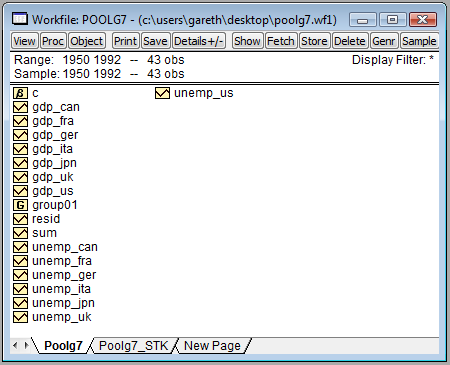
As you can see there are 7 cross-sections, CAN, FRA, GER, ITA, JPN, UK, USA, with 43 years of data (1950 to 1992) and two data series, GDP and Unemp.
Moving this data into a panel workfile is relatively simple. Via the menus you can do this:
Click on Proc->Reshape Current Page->Stack in New Page
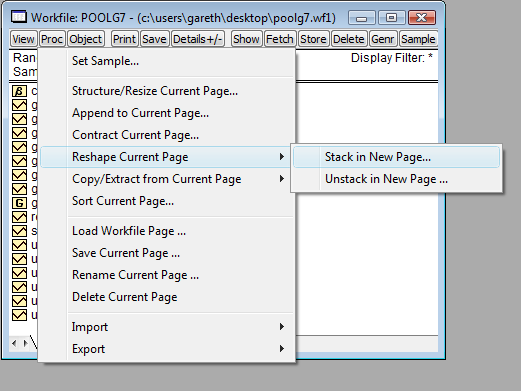 Enter the stacking identifiers.
You have a number of choices for this. The easiest, in this case, is to enter a series pattern. In our case our series (gdp and unemp) have a pattern of series_crossid. Thus I can use one of my series as a pattern. In this case I used unemp? The "?" represents the cross-section identifier (in this case _US or _CAN).
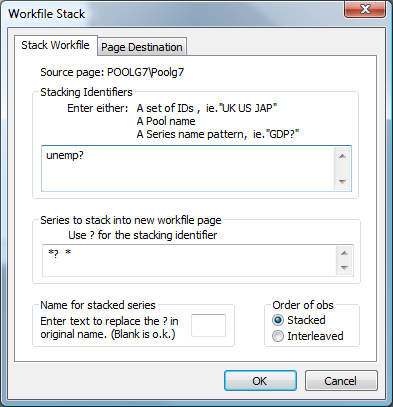 Hit ok, and you're done!
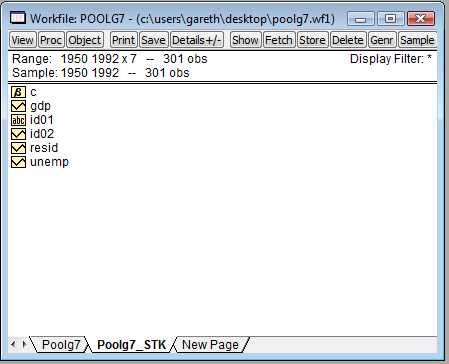
Note how you now have a panel workfile (you can tell from the Range statement at the top of the workfile - the fact it has a x7 at the end lets us know it is a panel).
Note if you wanted to do this via the command line, you just need to do this:
Simple!
Greetings Gareth,
Thanks for your post. Very useful indeed.
Once doing this, how does one type in the equations in a system for a Seemingly Unrelated Regression model?
Would it be something similar to the following?...
gdp_can=c(1)+c(2)*unemp_can
gdp_fra=c(3)+c(4)*unemp_fra
gdp_ita=c(5)+c(6)*unemp_ita
gdp_ger=c(7)+c(8)*unemp_ger
gdp_us=c(9)+c(10)*unemp_us
gdp_uk=c(11)+c(12)*unemp_uk
gdp_jpn=c(13)+c(14)*unemp_jpn
Hope I can get some help here :)
Cheers
Re: How to enter data into a panel workfile.
Posted: Thu May 07, 2015 2:12 am
by agaro123
For some reason, I can't open this as a panel, only as unstructured/undated. What am I doing wrong? Please see the attached file.
After i do the whole Hit Proc->Structure/Resize Current Page
Change the Workfile structure to "Dated Panel"
Enter Country as Cross section ID
Enter Year as Date series
It turns it into a 3d panel.
But then when I try to run a regression I can't choose whether to have fixed effects, so the "panel options" tab does not show up when estimating an equation.
Thanks!!
:D
Re: How to enter data into a panel workfile.
Posted: Thu May 07, 2015 7:59 am
by EViews Gareth
EViews doesn't support panel estimation features for 3D panels. Only for 2D panels. 99% of panel econometric theory only deals with 2D panels.
Re: How to enter data into a panel workfile.
Posted: Wed May 13, 2015 12:28 pm
by JanVinter
Hi
I have a very large dataset that I want to use as a panel dataset. However, I just cannot wrap my head around what modifications I need to make in order to get it to work as such within Eviews. I have monthly a unique account number, along with a customer number and a zipcode. For each unique account number, there is a monthly revenue figure. I am posting a small sample of that data here:
Thanks for the help :)
Re: How to enter data into a panel workfile.
Posted: Wed May 13, 2015 1:09 pm
by EViews Gareth
How is it panel data? What are the cross-sections?
Re: How to enter data into a panel workfile.
Posted: Wed May 13, 2015 1:27 pm
by JanVinter
Sorry, upon further inspection, I suppose it is not panel data. Account Key, Customer Key and Zip Code should, naturally, be constant across time. I just can't find a way to get the data in a format that enables me to carry out time series operations.
Re: How to enter data into a panel workfile.
Posted: Wed May 13, 2015 1:30 pm
by EViews Gareth
Figure out what your data are first, then we can help you figure out how to get it into EViews :D
Re: How to enter data into a panel workfile.
Posted: Wed May 20, 2015 11:27 pm
by agaro123
EViews doesn't support panel estimation features for 3D panels. Only for 2D panels. 99% of panel econometric theory only deals with 2D panels.
Is there a way I could turn this into a 2d panel without losing significance?
If I use the attached file, what is the Eviews command to create unique cross section ids? I guess my problem is that I have observations for the given countries for the same years from different partners. How should I proceed if I simply don't include the partners in the analysis, but I still want to keep the same observations?
Thanks!
Re: How to enter data into a panel workfile.
Posted: Thu May 21, 2015 8:02 am
by EViews Gareth
That question is not an EViews questions, so you'll have to ask it in the Econnometrics section, and hope a non-EViews team member will help you :D
Re: How to enter data into a panel workfile.
Posted: Sun Jul 05, 2015 7:42 am
by Redwing153
SO I have created a panel using the first method described by Gareth at the top of this thread. I have imported 14 time series (using the excel wizard), created a pool and using that pool created a new page with my panel data in it.
I want to update this panel data as new time series data becomes available (i.e. updated for the passage of time) and I am really struggling to achieve this.
My first problem is that when new data becomes available my page (containing the original series data and my pool object) does not expand (i.e. the date range does not increase) to incorporate the new excel data. I am currently working around this by 1) expanding the workpage manually and 2) Object>Manage Links and Formulae>Properties and then changing the cell range manually.
My second problem is that once I have expanded my work page and updated my time series, I am finding it impossible to update my panel page to reflect the new data. In fact the only way I have been able to achieve this is to delete the page and start again.
Ultimately I want to be able to use the add-in in excel to extract my panel data so I can chart it in excel.
Is there a quicker way around problem one?
How do I link my panel data to the original time series data such that it an be updated when my time series update?
thanks..
R
Re: How to enter data into a panel workfile.
Posted: Sun Jul 05, 2015 11:14 am
by EViews Gareth
Creating a panel from Excel data via the pool method is roundabout. Just go straight from Excel into a panel in EViews. Then you can have links updating etc...
Re: How to enter data into a panel workfile.
Posted: Sun Jul 05, 2015 12:10 pm
by Redwing153
Thanks Gareth (especially given it is a Sunday).
However I'm not sure that works for me as the primary method of getting data into eviews for me will be via Bloomberg and Datastream databases; Pretty sure I can't download straight from them in a manner suitable for panel data.
What would you suggest?
thanks again
R.
edit - sorry I didn't make myself clear - I'm importing from excel because I'm at home and don't have access to Dstream and Bloomberg right now - I'm essentially testing how I go about doing the above. I didn't realise there would be any real difference.
Re: How to enter data into a panel workfile.
Posted: Sun Jul 05, 2015 1:22 pm
by EViews Gareth
Then you're pretty much out of luck. Neither Datastream or Bloomberg provide stacked panel data, so, yeah, you'll have to go via a pool interface, but then you can't have auto-updating. Best thing to do is write a program that does all the import/manipulation for you, then re-run the program whenever you want to update.
Re: How to enter data into a panel workfile.
Posted: Sun Jul 05, 2015 1:24 pm
by Redwing153
ok, thanks - at least I know how to progress!
As an aside - when I create a panel structure using Proc/Reshape current page - there is only the option to stack in a new page - I cant overwrite a previous stack - is that correct? Presumably a program might do that for me?
Re: How to enter data into a panel workfile.
Posted: Sun Jul 05, 2015 5:24 pm
by EViews Gareth
In a program you could delete the existing page (pagedelete) then restack it.