Page 1 of 1
Excel Corruption Issue (EViews 13, windows)
Posted: Tue Apr 30, 2024 2:39 pm
by madm
Hi,
We are having an issue when running programs in EViews 13 that read multiple sheets from an Excel workbook. I think this only happens when we also have the file open in Excel. First, we are seeing that multiple tmp files get produced (see screenshot), which appear to be backup copies of the original excel file. But very occasionally this seems to cause an EViews crash, which results in deletion of the xlsx file. We have no such issue with EViews 12. If this isn't a known issue and you need more info, let me know.
Thanks!
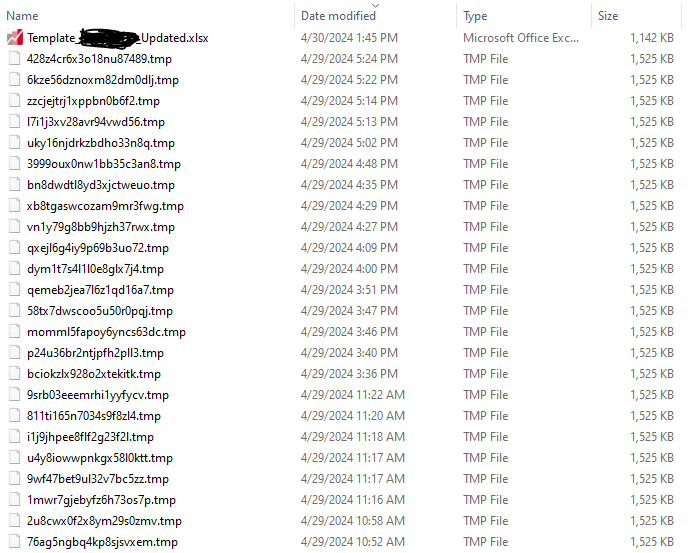
- Capture.PNG (59.38 KiB) Viewed 57807 times
Re: Excel Corruption Issue (EViews 13, windows)
Posted: Tue Apr 30, 2024 2:43 pm
by EViews Gareth
Could you describe what you mean by "This seems to cause an EViews crash"?
Also, what's the build date of your copy of EViews 13 (Help->About EViews).
Re: Excel Corruption Issue (EViews 13, windows)
Posted: Tue Apr 30, 2024 2:52 pm
by madm
Re "seems it causes a crash", typo. The crash coincides with file deletion.
Enterprise Edition -- Oct 11 2023 build
Re: Excel Corruption Issue (EViews 13, windows)
Posted: Tue Apr 30, 2024 3:04 pm
by EViews Gareth
Yes, deleting the files when EViews is running could cause a crash.
EViews should delete the files itself after 30 days (Options->General Options->File Locations).
If you want to manually delete them, doing so when EViews is not open should be fine.
Re: Excel Corruption Issue (EViews 13, windows)
Posted: Tue Apr 30, 2024 3:10 pm
by madm
Yes, deleting the files when EViews is running could cause a crash.
EViews should delete the files itself after 30 days (Options->General Options->File Locations).
If you want to manually delete them, doing so when EViews is not open should be fine.
Sorry I wasn't clear. We're not manually deleting anything, just trying to read the files from Excel. EViews and/or Excel seem to be triggering the deletion of the Excel workbook and that coincides with the crash in EViews. To reiterate, in EViews 12 we did not have this problem.
Re: Excel Corruption Issue (EViews 13, windows)
Posted: Tue Apr 30, 2024 3:12 pm
by madm
As an additional hint, when we use:
We will sometimes get back a list with a first entry that is not an excel sheet like below:
Code: Select all
_XLNM._FILTERDATABASE CONFIG CONTROL DATA MAIN
Then when we do:
Code: Select all
	for %N {%NAMES}
		importtbl(name=%N) %EXCEL_FILE range=%N
	next
The first entry "_XLNM._FILTERDATABASE" will immediately crash EViews although sometimes there are other sheet names returned that are similarly problematic (I don't have a list of names handy). We put in a workaround for that particular sheet name and I think because of that we haven't had a crash in a while but we're still seeing the excel workbook TMP files being produced, which isn't ideal and wasn't happening in EViews 12.
Re: Excel Corruption Issue (EViews 13, windows)
Posted: Tue Apr 30, 2024 3:38 pm
by EViews Gareth
Does all this occur with a specific file, or are you having issues reading all Excel files?
Re: Excel Corruption Issue (EViews 13, windows)
Posted: Tue Apr 30, 2024 3:44 pm
by madm
It is occurring with many different files where we are reading from multiple tabs. I suspect but not 100% sure that it only (or at least more frequently) happens if we simultaneously have the file open in Excel. For context, these are input sheets that we are using to create a large-scale forecast model.
Re: Excel Corruption Issue (EViews 13, windows)
Posted: Tue Apr 30, 2024 4:36 pm
by EViews Gareth
It is probably related to Excel being open, yes. If Excel is open, we ask Excel to handle the file read. If Excel is closed, EViews does it. (Roughly).
We'll poke around, but in the meantime recommend having Excel closed.
Re: Excel Corruption Issue (EViews 13, windows)
Posted: Wed May 01, 2024 8:16 am
by madm
Will do for those of us on 13 but my team find it convenient to have the file open in Excel to be able to adjust the model specs and other settings between runs so they tend to leave the file open. This has been blocking us from moving on from EViews 12 to 13. I'll see if I can find another way around this.