Page 1 of 1
EIA API connection
Posted: Fri Jan 27, 2023 7:28 am
by BT454
Does eviews still have a built in connection to the EIA API? I can't seem to find it in the database registry.
Thanks!
Bob
Re: EIA API connection
Posted: Mon Jan 30, 2023 8:36 am
by EViews Gareth
Yes. Use the regcomponents command to re-register it.
Re: EIA API connection
Posted: Mon Jan 30, 2023 9:52 am
by BT454
Thanks!
Re: EIA API connection
Posted: Fri Feb 17, 2023 8:57 am
by BT454
This worked, but about a week later I lost access to most of the registered databases. I ran regcomponent, and I'm prompted with a dialogue box saying everything was registered successfully...but nonetheless, the databases are not appearing in the database registry....any thoughts?
Thanks!
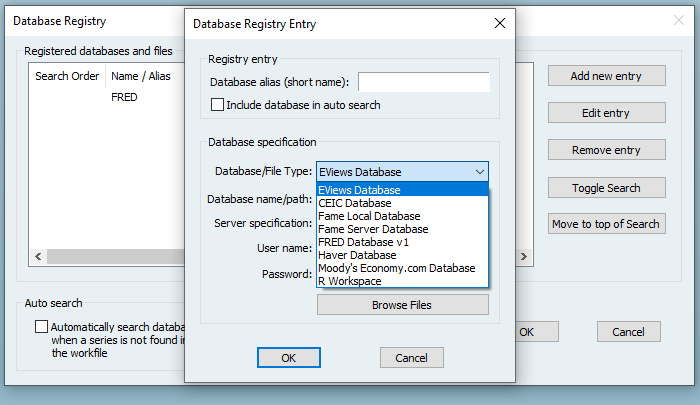
- eviews.png (29.69 KiB) Viewed 14336 times
Re: EIA API connection
Posted: Fri Feb 17, 2023 9:09 am
by EViews Gareth
I'm not sure I understand the question. Have you added any to your registry?
Re: EIA API connection
Posted: Thu Feb 23, 2023 8:11 am
by BT454
I did, but they all disappeared. I'm now routinely prompted with the "add registry" when I start eviews. I add them. They do not appear. I'd like to add an EIA connection, but I can't get it to show up in the registry under database types.
In other words, the only database types that appear are the ones that are showing in the dialogue box above, regardless of how many times I add them.
Re: EIA API connection
Posted: Thu Feb 23, 2023 8:54 am
by EViews Gareth
Sounds like EViews isn't able to store the registered EDXs. Could you try quitting EViews, then re-opening it as a local admin on your computer (can usually right click the EViews icon and say Run as Administrator), and then doing regcomponents?
Re: EIA API connection
Posted: Mon Feb 27, 2023 12:35 pm
by BT454
Thank you so much. That is very helpful. I have to provide admin creds (not my standard credentials) locally on my machine to run the updates and register the components, so perhaps this is indeed the issue.