Page 1 of 1
failed to initialize EViewsPyConn
Posted: Wed Mar 16, 2022 11:33 am
by amrsherif
Hello,
I am trying to run xopen(p) on my colleague's machine, and we are getting this error when we type xopen(p) in the command (also see attached photo):
Failed to initialize EViewsPyConn.
Unexpected python error (1)
Any chance this is a common error with a known solution?
It works on my other two computers
I have set the python path correctly in EViews' options
Re: failed to initialize EViewsPyConn
Posted: Wed Mar 16, 2022 1:45 pm
by EViews Steve
Try running the REGCOMPONENTS command to re-register all EViews components. Once done, try the XOPEN call again.
If you continue to run into issues, please provide the following details:
1. Path to your python home
2. Python version you are trying to use
3. 32-bit or 64-bit python?
4. Generic Python or Anaconda Python?
5. EViews version and build date.
Re: failed to initialize EViewsPyConn
Posted: Wed Mar 16, 2022 5:48 pm
by amrsherif
I was trying python 3.10
I just downlaoded 3.7 (which is the version working on my PC) and it works.
Could you tell me the latest version of python that works with EViews?
Re: failed to initialize EViewsPyConn
Posted: Thu Mar 17, 2022 8:41 am
by EViews Steve
We've been using EViews with python 3.9 successfully.
But I've verified that 3.10 does seem to have the problem you reported. My guess is that the public interface in python310.dll has been changed significantly.
We will look into it.
Steve
Re: failed to initialize EViewsPyConn
Posted: Thu Mar 17, 2022 10:13 am
by EViews Steve
We found the problem with Python 3.10. It will be fixed in the next EViews 12 patch.
Re: failed to initialize EViewsPyConn
Posted: Thu Mar 17, 2022 10:47 am
by amrsherif
Thank you!
Re: failed to initialize EViewsPyConn
Posted: Fri Sep 01, 2023 6:50 am
by madm
We found the problem with Python 3.10. It will be fixed in the next EViews 12 patch.
I'm also having this problem and can't use
Two questions:
Was this fix rolled out? We are currently on Feb 4, 2021 build of EViews 12. Due to my company's IT policy, rolling to newer versions can lag release updates by a year or more.
What was the problem? If the problem is a DLL compatibility issue then I'm stuck until we roll to a newer version of EViews but if it's something on the python side, we might be able to work around it.
Thanks!
Re: failed to initialize EViewsPyConn
Posted: Fri Sep 01, 2023 9:04 am
by EViews Steve
Yes, fix was rolled out.
EViews 12 was calling a Python DLL method before it was properly initialized. This wasn't an issue before, but Python 3.10 didn't like it.
To use Python 3.10, you'll have to patch EViews 12 to a build date that is at least March 17, 2022.
If you can't update EViews 12, I would suggest you use an older version of Python 3, such as Python 3.9.
Re: failed to initialize EViewsPyConn
Posted: Thu Nov 30, 2023 8:49 am
by fmramos
Hey, there!
Same issues here, but under EV13 Enterprise (build Nov 28, 2023). My Python is the latest one, 3.12, x64. Meanwhile I will try to install an earlier version.
Best, Fabio.
Failed to initialize EViewsPyConn.
Could not find the following Python DLL methods and elements:
PyUnicode_AsUnicode
You may need to reinstall Python or install a different Python
version. Make sure your Python installation is at least version
2.7.15 or 3.6.5.
Re: failed to initialize EViewsPyConn
Posted: Thu Nov 30, 2023 9:07 am
by fmramos
For earlier versions, all good. Using Version: 3.11.2. For 3.12, no connection.
Best, F
Re: failed to initialize EViewsPyConn
Posted: Thu Nov 30, 2023 10:22 am
by EViews Steve
Thanks for the report. I've been able to confirm that that method was deprecated and removed by Python 3.12. A fix will be released in next week's 13 patch.
Steve
Re: failed to initialize EViewsPyConn
Posted: Sat Feb 17, 2024 9:42 am
by fmramos
Hi Steve and EV team:
Problem returned:
"Failed to initialize EViewsPyConn.
Python dll path is missing."
My version is EV13, Jan 8 2024 update (I think it is the last available).
Python 3.12 64bits.
I've already tried using 'regcomponents' without success.
Tks in advance for any help. Best, Fabio
Re: failed to initialize EViewsPyConn
Posted: Sat Feb 17, 2024 12:13 pm
by EViews Steve
Have you checked the python path you're using within EViews?
Go to Options menu/General Options/External program interface. Double-check the "Home Path" value for Python. Make sure that folder is still valid and also contains an actual "pythonX.dll" (e.g. python3.dll). Also, go to that folder and see if you can actually run python.exe from that location to make sure it's installed correctly.
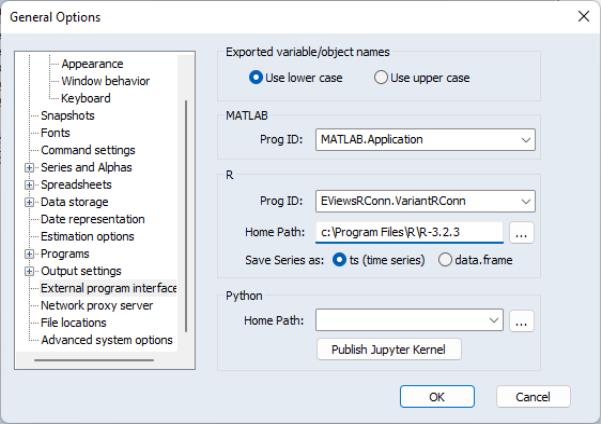
- external.087.4.2.jpg (36.98 KiB) Viewed 31980 times