Page 1 of 1
Import hourly data - workfile
Posted: Mon Jan 21, 2019 11:20 am
by AfonsoRod
Dear all,
I have a hourly data with values from 01-jan-2009 to 31-dec-2018, and I am facing some difficulties to import it correctly to Eviews 10.
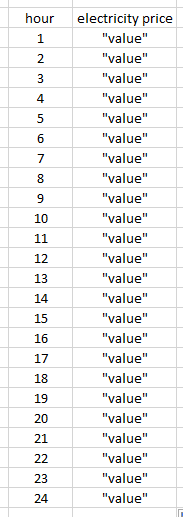
The topic of the data is energy, more precisely, electricity and one of the variables is the electricity price. So, my excel is something like this:
- eviews2.PNG (8.76 KiB) Viewed 9868 times
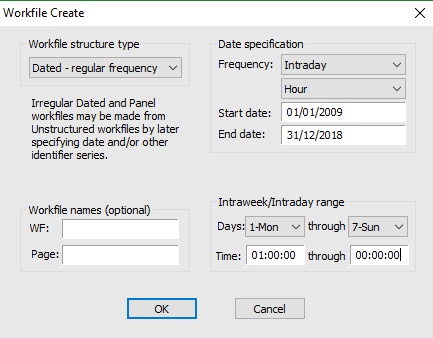
Before I imported the data I have created a new work-file to define the frequency of my data. The specifications can be seen above:
- eviews1.PNG (12.59 KiB) Viewed 9868 times
The problem is that Eviews changes the data range from 01:00h-00:00h to 00:00h-23.00h, witch is causing, for example, that the value I have defined in Excel at (for example) 18h at a certain day, appears in Eviews not at 18h but insted at 17h.
How can I solve this?
Thank you all in advance.
Best regards
Afonso Rodrigues
Re: Import hourly data - workfile
Posted: Mon Jan 21, 2019 1:14 pm
by EViews Gareth
How are you doing the import?
Re: Import hourly data - workfile
Posted: Mon Jan 21, 2019 3:07 pm
by AfonsoRod
How are you doing the import?
Dear Gareth
Thanks for your answer.
After creating the workfile I import my data going "import from file" and then chose my excel. I've tried to upload an excel with both the date and hour columns and other without those columns. Either way I can't manage to do what I wanted to.
After some more research I found out that eviews deals with each hour like an interval, meaning that for example the price in 17h its the price between 17h and 18h. If this is true, I would like to know if I can make eviews do this but instead of using the first hour of the interval, make it use the last so that the price in hour 17 is the price between 16h and 17h instead of the price between 17h and 18h.
Thank you for the help.
Re: Import hourly data - workfile
Posted: Mon Jan 21, 2019 6:03 pm
by EViews Gareth
Are you doing a "Dated read" import or a "Sequential read" import?
If dated, try doing sequential (assuming your file has the same number of rows as the workfile etc...)
Re: Import hourly data - workfile
Posted: Tue Jan 22, 2019 3:41 am
by AfonsoRod
Are you doing a "Dated read" import or a "Sequential read" import?
If dated, try doing sequential (assuming your file has the same number of rows as the workfile etc...)
I've tried to do a sequential read import but everything stays the same.
Re: Import hourly data - workfile
Posted: Tue Jan 22, 2019 8:45 am
by EViews Gareth
Could you provide an example excel file (over-write the data with random numbers if confidentiality is an issue).
Re: Import hourly data - workfile
Posted: Tue Jan 22, 2019 9:11 am
by AfonsoRod
Could you provide an example excel file (over-write the data with random numbers if confidentiality is an issue).
Re: Import hourly data - workfile
Posted: Tue Jan 22, 2019 9:38 am
by EViews Gareth
I'm not sure I follow the issue...
It seems like EViews is putting the data in the correct place. Are you just worried about the labeling of the hours? The observation labeled as:
Has a value of 0.801182 for series A. That observation is the time between midnight and 1am (00:00 and 01:00). Which, it seems to me, would be what you refer to as hour 1?
Re: Import hourly data - workfile
Posted: Tue Jan 22, 2019 10:09 am
by AfonsoRod
I'm not sure I follow the issue...
It seems like EViews is putting the data in the correct place. Are you just worried about the labeling of the hours? The observation labeled as:
Has a value of 0.801182 for series A. That observation is the time between midnight and 1am (00:00 and 01:00). Which, it seems to me, would be what you refer to as hour 1?
Yes, I know that in terms of outcome it will be just fine. I understood that after some research. So yes, it's just a labeling issue (a detail). I was just wondering if its possible for Eviews to, instead of showing results as hourly intervals, if it is possible to show it like first hour, second hour, etc etc..
So, the first value instead of being labeled as 00:00 (midnight) it would be labeled as 1h (first hour).
Re: Import hourly data - workfile
Posted: Tue Jan 22, 2019 10:13 am
by EViews Gareth
Unfortunately not.
You could create an alpha series containing the format you want (something like alpha a = @datestr(@date, "DD/MM/YYYY") + " " + @str(@hour+1)), then structure the workfile as undated by id series, where that alpha is the id series. But once you've done that, EViews will lose all knowledge of dates/time.
Re: Import hourly data - workfile
Posted: Tue Jan 22, 2019 10:16 am
by AfonsoRod
Unfortunately not.
You could create an alpha series containing the format you want (something like alpha a = @datestr(@date, "DD/MM/YYYY") + " " + @str(@hour+1)), then structure the workfile as undated by id series, where that alpha is the id series. But once you've done that, EViews will lose all knowledge of dates/time.
Ok, I'll just keep doing it this way and remind my brain that the value in 17.00h means the value of the 16th hour xD
thanks a lot for the time you spent with me. Appreciate it.