Use our Excel Add-In to import and link your matrices into a specific cell range.
In the Excel menu, click the Add-Ins tab.
In the ribbon, look for the EViews group and click the Get Data button.
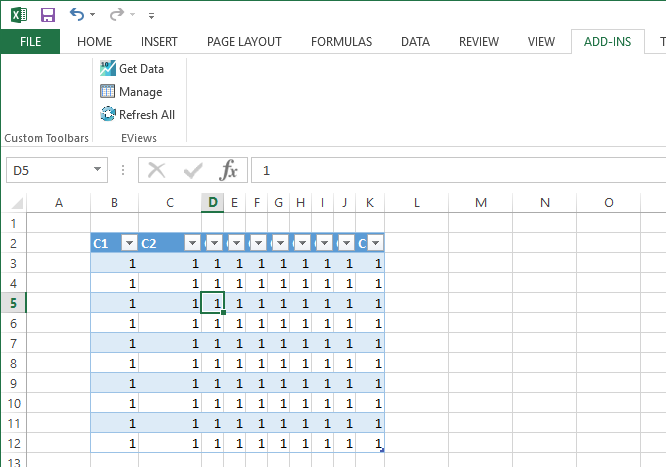
- example3.png (19.42 KiB) Viewed 5275 times
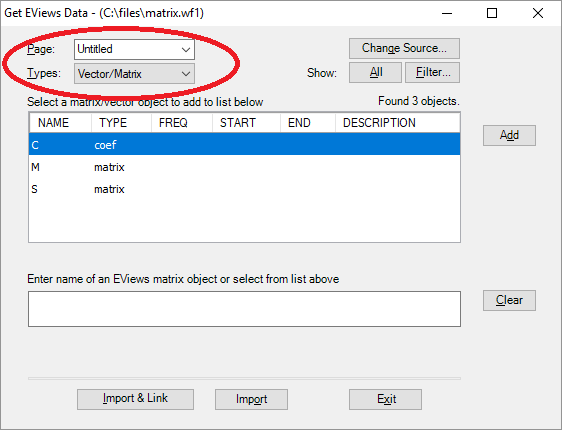
Select your workfile.
Next to Types, select "Vector/Matrix".
- example4.png (12.18 KiB) Viewed 5275 times
Select one of your matrices from the list.
Click the Import & Link button.
Select the cell range in your spreadsheet to place the matrix.
Repeat this process for your other matrices.
This process simply creates an Excel OLEDB data connection in your spreadsheet. You can manage this connection by clicking the Manage button in our add-in, or you can go to the Data tab and click "Connections" to view the spreadsheet's data connections.
Now the next time your matrix data changes, simply save the workfile, then open the Excel spreadsheet, click on the Data tab, then click the "Refresh All" button to refresh all the values.
Steve