Page 1 of 1

Connect to External databases

Posted: Thu Oct 26, 2017 3:18 am
by loulouviews
Hello,

I have recently upgraded to EViews 10 to access SDMX databases.
Nonetheless, I have experienced the following error when browsing ECB or Eurostat databases:

Code: Select all

Error: unable to retrieve datasets.
I have tried others web-hosted databases:
- Fred v1 is working fine
- but Fred queries returns

Code: Select all

"server returned unexpected content"
Do you have any idea where the error came from?

Best,

Louis

Re: Connect to External databases

Posted: Thu Oct 26, 2017 8:21 am
by EViews Katerina
The problems you are experiencing with SDMX databases and Fred might be internet access.
Are you behind a proxy server?

Re: Connect to External databases

Posted: Thu Oct 26, 2017 12:32 pm
by terrya
I've had the same problem as well (but not with FRED). There is no possibility that it's the internet connection in my case, as I can access the data bases easily using R. For example, I can get data from the ECB easily using the following R instruction:
pdfetch_ECB(c("EXR.D.AUD.EUR.SP00.A","EXR.D.CAD.EUR.SP00.A",
"EXR.D.CHF.EUR.SP00.A","EXR.D.GBP.EUR.SP00.A",
"EXR.D.JPY.EUR.SP00.A","EXR.D.NOK.EUR.SP00.A",
"EXR.D.NZD.EUR.SP00.A","EXR.D.SGD.EUR.SP00.A",
"EXR.D.SEK.EUR.SP00.A","EXR.D.USD.EUR.SP00.A"))

I tried to replicate this using EViews 10+ and failed. On the few occasions I could get data, one series at a time, I had to do it in very cumbersome way (too difficult to explain how in this comment). Amongst other things, I was told that the identifiers were unknown.

What I do to get around this problem is to pull in data using R, save as an Excel sheet and load the sheet into Eviews.

Re: Connect to External databases

Posted: Thu Oct 26, 2017 12:54 pm
by terrya
Update:

Just to check things, I tried to get the ECB data again a few moments ago using R and got the error message:
"Series EXR.D.AUD.EUR.SP00.A not found"

This is odd as I downloaded data from the ECB a few days ago without any trouble. It would appear that some change has occurred in accessing data from the ECB at least. I haven't used R to get data from EUROSTAT so can't comment on this.

Re: Connect to External databases

Posted: Thu Oct 26, 2017 1:00 pm
by terrya
Further update

I just tried connecting to EUROSTAT via R using the example in the package pdfetch and got the message that the series couldn't be found.

Re: Connect to External databases

Posted: Thu Oct 26, 2017 2:41 pm
by EViews Steve
I've had the same problem as well (but not with FRED). There is no possibility that it's the internet connection in my case, as I can access the data bases easily using R. For example, I can get data from the ECB easily using the following R instruction:
pdfetch_ECB(c("EXR.D.AUD.EUR.SP00.A","EXR.D.CAD.EUR.SP00.A",
"EXR.D.CHF.EUR.SP00.A","EXR.D.GBP.EUR.SP00.A",
"EXR.D.JPY.EUR.SP00.A","EXR.D.NOK.EUR.SP00.A",
"EXR.D.NZD.EUR.SP00.A","EXR.D.SGD.EUR.SP00.A",
"EXR.D.SEK.EUR.SP00.A","EXR.D.USD.EUR.SP00.A"))

I tried to replicate this using EViews 10+ and failed. On the few occasions I could get data, one series at a time, I had to do it in very cumbersome way (too difficult to explain how in this comment). Amongst other things, I was told that the identifiers were unknown.

What I do to get around this problem is to pull in data using R, save as an Excel sheet and load the sheet into Eviews.
First, let me say that Katerina's question about whether or not the OP has a proxy server or not is still a relevant question. Your R code might be able to navigate the proxy server correctly, whereas I know the initial versions of these new EDX controls do not handle proxies correctly.

Second, I'd like to address your statement about retrieving data from the ECB. The ECB EDX interface from within EViews is different. When we created it, we had in a mind a user that wanted to discover what was available from the ECB as they navigated thru it. Hence, when you first click the Browse button you see a readable list of available datasets:
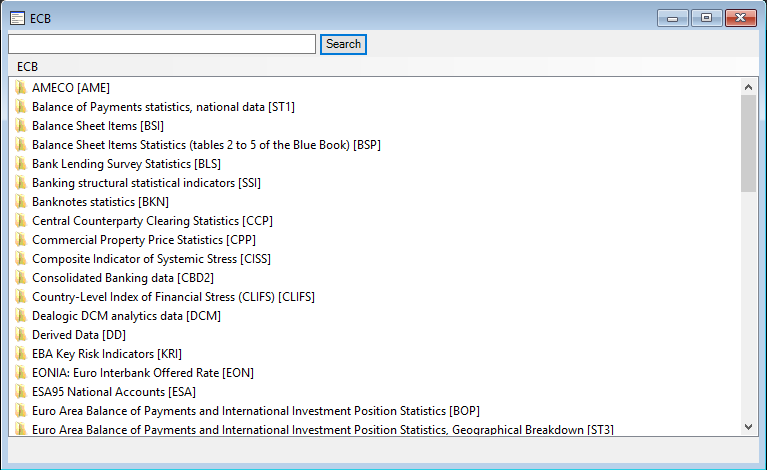
ecb_browse.png
ecb_browse.png (27.56 KiB) Viewed 15863 times
If you notice in your first ECB object name above ("EXR.D.AUD.EUR.SP00.A"), the first part of that name specifies the ECB database. In our case, if you type in EXR into the search textbox and hit Search, you'll see the corresponding database name (Exchange Rates):
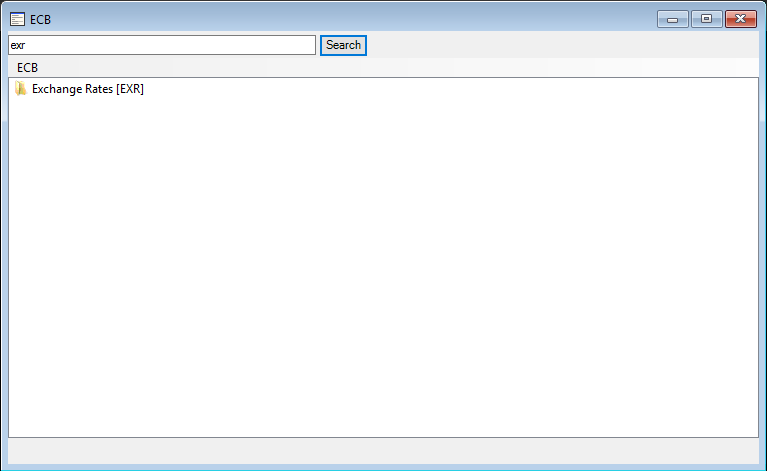
ecb_browse_exr.png
ecb_browse_exr.png (7.53 KiB) Viewed 15863 times
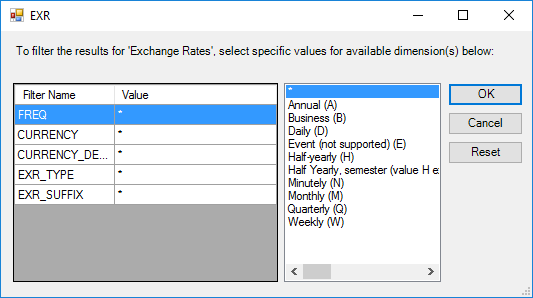
If you click that database node, you'll see a dialog that shows the available filters:
ecb_filter_exr.png
ecb_filter_exr.png (10.76 KiB) Viewed 15863 times
Each row of filters corresponds to an element in your object name - in fact, the element lines up exactly as we are displaying these elements as the ECB defines them.

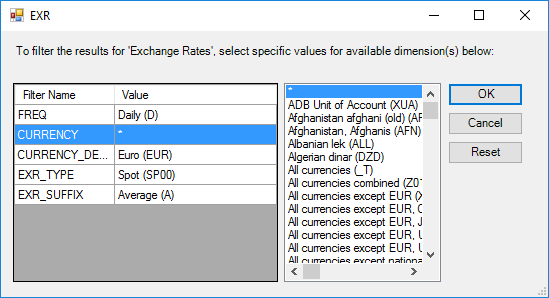
So to match EXR.D.AUD.EUR.SP00.A, you would pick Freq=Daily, Currency=AUD, Currency_Denomination=EUR, EXR_Type=Spot (SP00), and EXR_Suffix=Average (A). To see a list of all of the ones you mentioned above, you would make Currency=* or Currency=AUD,CAD,CFH,etc. (this filter lets you pick multiple items from the list).
ecb_filter_exr_2.png
ecb_filter_exr_2.png (14.4 KiB) Viewed 15863 times
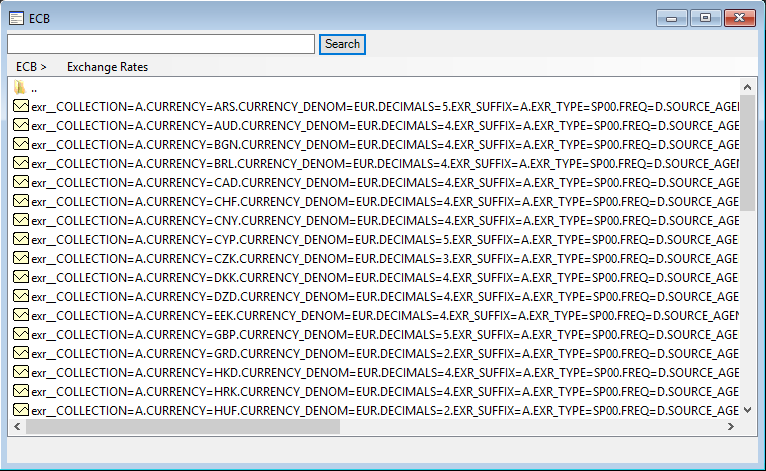
Once selected, if you click OK, you'll see a list like this:
ecb_filter_exr_3.png
ecb_filter_exr_3.png (47.61 KiB) Viewed 15863 times
You can now select these objects to make them appear back into the EViews Database window for ECB. Once there, you can drag them to a workfile or export them to a new workfile to see the data.

The names of these objects are a bit long, but we wanted to support the possibility of ECB re-ordering their filters or adding new ones in the future.

Steve

Re: Connect to External databases

Posted: Thu Oct 26, 2017 2:49 pm
by terrya
Thanks for your suggestions. I had figured out part of the procedure but not the lot.

As far as the proxy server issue goes, if you mean my end then it's irrelevant as I don't use one.

Re: Connect to External databases

Posted: Fri Oct 27, 2017 7:08 am
by loulouviews
Hi Katerina and Steve,

Thanks for your answers.
Yes, I am behind a proxy server. I also suspect that the proxy is the reason why I can't access the data.
However, what puzzles me is that I still can read Fred v1 data and I am able to fetch data over the internet with import and wfopen command.

How can I proceed to see if my proxy is the issue ?

Note that I work in a big institution with a highly restricted internet access, to say the least. Before I get lost in the twists and turns of my IT department, I would like to make sure the issue is on my side :wink:


Louis

Re: Connect to External databases

Posted: Fri Oct 27, 2017 12:48 pm
by terrya
In case anyone is interested, I just tried retrieving data from the ECB using R and found the connection is working again.

Re: Connect to External databases

Posted: Fri Oct 27, 2017 1:50 pm
by EViews Katerina
If you are behind a proxy please download this zip file:
http://www.eviews.com/misc/EDX_40_3.zip

and then unzip this file into your current EViews 10 folder. This should overwrite the various EDX files with newer versions that look at the proxy settings. Please e-run EViews10 once your updated.
The new versions of EDX files will be placed in the next EViews10 patch.

Additionally you can try to open FRED Database (which looks at the proxy settings) and see if that will work behind the proxy server

Re: Connect to External databases

Posted: Mon Oct 30, 2017 2:27 am
by loulouviews
It works ! 8)
Thanks Katerina ! :D