Page 1 of 2
Create a time trend
Posted: Thu Jun 02, 2016 3:30 am
by DannyB
Hi everyone,
I'm currently using C#.NET COM to execute EViews command.
But i have a problem.
I have a trend who count 588 data points and i want to create a time series who start at 1 and finish at 588 (the last count of my main trend).
How can i do that without using an "if next" statement? Now i'm using "series time_trend = @trend+1" because @trend start from 0 and to be sure i have tu create my own trend who start with the value 1.
Regards.
Re: Create a time trend
Posted: Thu Jun 02, 2016 3:56 am
by EViews Gareth
@trend+1
Re: Create a time trend
Posted: Thu Jun 02, 2016 4:09 am
by DannyB
@trend is always starting from 0?
Re: Create a time trend
Posted: Thu Jun 02, 2016 4:44 am
by EViews Gareth
Yes
Re: Create a time trend
Posted: Fri Apr 28, 2017 1:19 pm
by maragloria
Hello Gareth,
I would like to clarify a doubt: @trend starts from zero according to the range or the sample?
I've just run the function and realized that if sample < range, @trend starts from zero from the beginning of the range.
This happens with linear trends in cointegration estimations as well. Is there a way around this?
Many thanks!
Re: Create a time trend
Posted: Fri Apr 28, 2017 1:44 pm
by startz
Help @trend
Re: Create a time trend
Posted: Fri Apr 28, 2017 2:08 pm
by maragloria
Thanks for your prompt reply.
I understand that one can specify @trend with the date where one would like to start, but what to do in the context of cointegration estimation where one chooses to use the specification with trend?
I just realized that in the context of ARDL estimation, the EC obtained in Proc->Make Cointegrating ... uses a trend initiated to the beginning of the range (and not to the beginning of the sample, as I was expecting). See excel file attached.
Re: Create a time trend
Posted: Fri Apr 28, 2017 2:11 pm
by startz
Not really sure, but does it make any difference what the starting value of the trend is?
Re: Create a time trend
Posted: Fri Apr 28, 2017 2:14 pm
by maragloria
In this case, yes, as you can see in the file: column K (and L), gives the EC using a trend set at the beginning of the range, while column M gives the EC with trend set at beginning of sample.
Re: Create a time trend
Posted: Fri Apr 28, 2017 2:25 pm
by EViews Gareth
But does it matter as long as the trend uses in making the cointegrating relationship is the same trend that was used during estimation?
Re: Create a time trend
Posted: Fri Apr 28, 2017 2:41 pm
by EViews Mirza
But does it matter as long as the trend uses in making the cointegrating relationship is the same trend that was used during estimation?
Indeed. Any deterministic dynamics (such as trends) used in estimation, must be identical to those used in deriving the EC term, otherwise, the model being suggested where the trend in the EC term is initiated at 1 at time t=T1, although the model estimated was initiated at t=1, would imply missing estimates proportional in magnitude of the missing trend elements 1, ... , T1, thereby creating bias in the estimation of the remaining variables. Estimating the model under one sample, and then artificially restarting the trend in the EC term for a sub-sample of the estimation is theoretically incorrect.
Re: Create a time trend
Posted: Fri Apr 28, 2017 4:00 pm
by maragloria
Here's the problem I'm having, and the reason I started suspecting the trend issue.
I'm running ARDL estimation (including a linear trend) where I'm mostly interested in the long-run relationship.
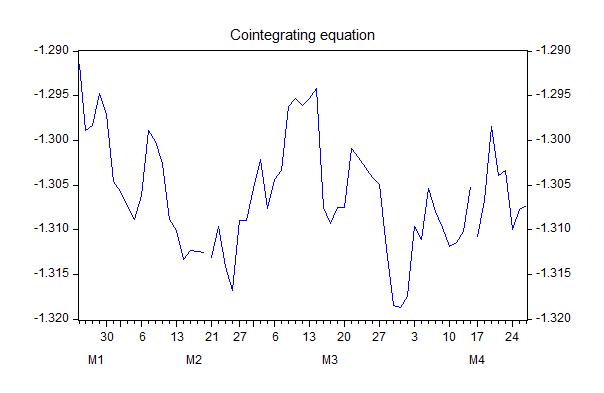
I obtained the "Cointegration graph", but the scale do not make sense (it's way too big):
- evw1.jpg (24.74 KiB) Viewed 25180 times
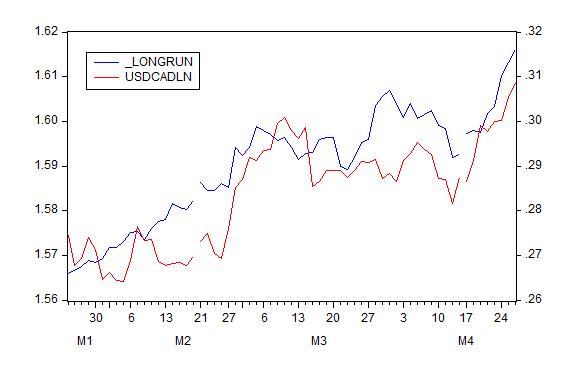
To double check, I got the "long-run" equation by running: long-run = dependent variable - cointeq
The implicit long-run is way off the scale of the dependent variable:
- evw3.jpg (25.35 KiB) Viewed 25180 times
So, my suspicions are with the trend because when I run estimations using the full range, the scale of the "Cointegration graph" makes much more sense (-2% to 12%).
Unless the issue could be related to the fact that the constant disappears from the "levels equation":
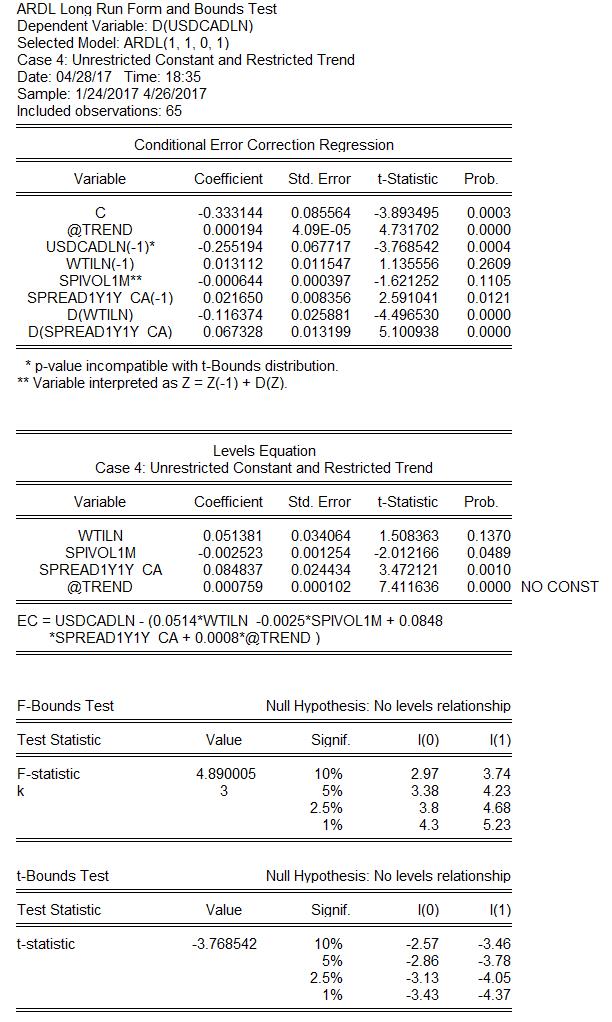
- evw2.jpg (123.39 KiB) Viewed 25180 times
Many thanks for your attention.
Re: Create a time trend
Posted: Fri Apr 28, 2017 4:11 pm
by EViews Mirza
Here's the problem I'm having, and the reason I started suspecting the trend issue.
Could you provide the data you are working with in this example?
Re: Create a time trend
Posted: Sat Apr 29, 2017 6:42 am
by maragloria
Re: Create a time trend
Posted: Sat Apr 29, 2017 7:34 am
by maragloria
Please note that simple OLS regression (using the @trend function) and Johasen estimation (case 4) do not have the problem.