Page 1 of 2
Somewhat strange behavior in forecast combination
Posted: Sun Jul 26, 2015 9:07 am
by yzhao
Hello,
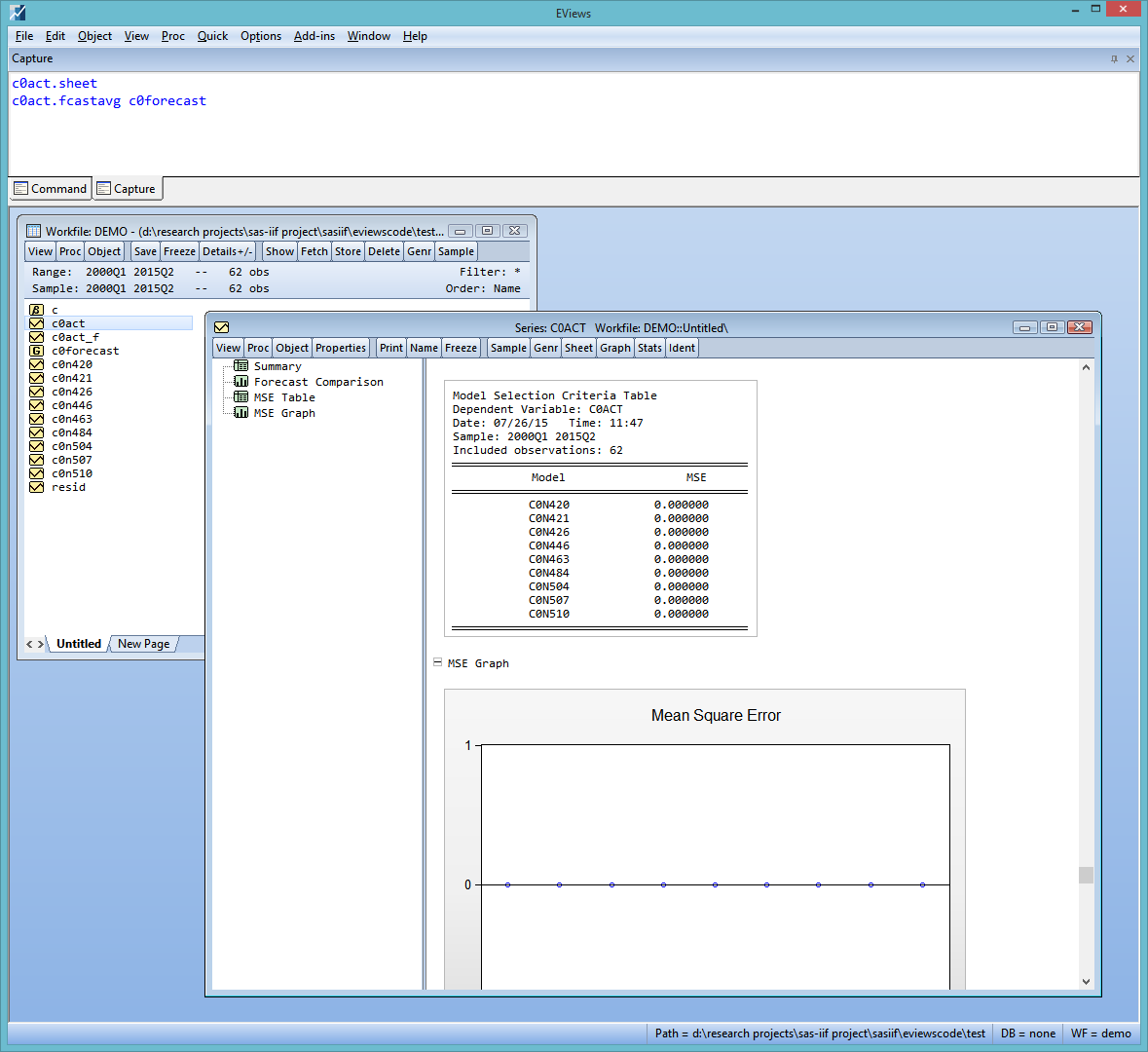
I was trying out the new forecast combination procedures today and noticed some rather strange behavior, as shown in the attached screenshot, namely, MSE table and graph show nothing but zeros. In the attached workfile, c0act is the actual value, c0n??? are individual forecast series, and c0forecast is the group of the individual forecasts. Data come from US SPF. I tried this many time, mostly I get this strange behavior. But there was one time that it worked correctly, i.e., MSE table and graph show meaningful numbers. A few times EViews crashes (or hangs) when I try to do the forecast combination. One of the windows application log entry is as follows:
Faulting application name: EViews9_x64.exe, version: 8.0.0.0, time stamp: 0x55943fce
Faulting module name: EViews9_x64.exe, version: 8.0.0.0, time stamp: 0x55943fce
Exception code: 0xc0000005
Fault offset: 0x00000000002109d3
Faulting process id: 0xd04
Faulting application start time: 0x01d0c7b0611f039c
Faulting application path: C:\Program Files\EViews 9\EViews9_x64.exe
Faulting module path: C:\Program Files\EViews 9\EViews9_x64.exe
Report Id: bdae33e0-33a9-11e5-825e-382c4a714a45
Faulting package full name:
Faulting package-relative application ID:
Anyone has thoughts or similar issues? Thanks!
Workfile:
- demo.WF1
- (21.38 KiB) Downloaded 223 times
Screenshot showing the issue:
- Screenshot.png (54.8 KiB) Viewed 6700 times
By the way, I'm on the Jul 23, 2015 version of EViews 9.
Re: Somewhat strange behavior in forecast combination
Posted: Sun Jul 26, 2015 3:30 pm
by EViews Gareth
You didn't set a training sample, so MSE could not be calculate. We should probably fix it such that the table/graph isn't displayed when you choose not to use a training sample.
Re: Somewhat strange behavior in forecast combination
Posted: Sun Jul 26, 2015 7:53 pm
by yzhao
That makes sense for sure. Thank you!
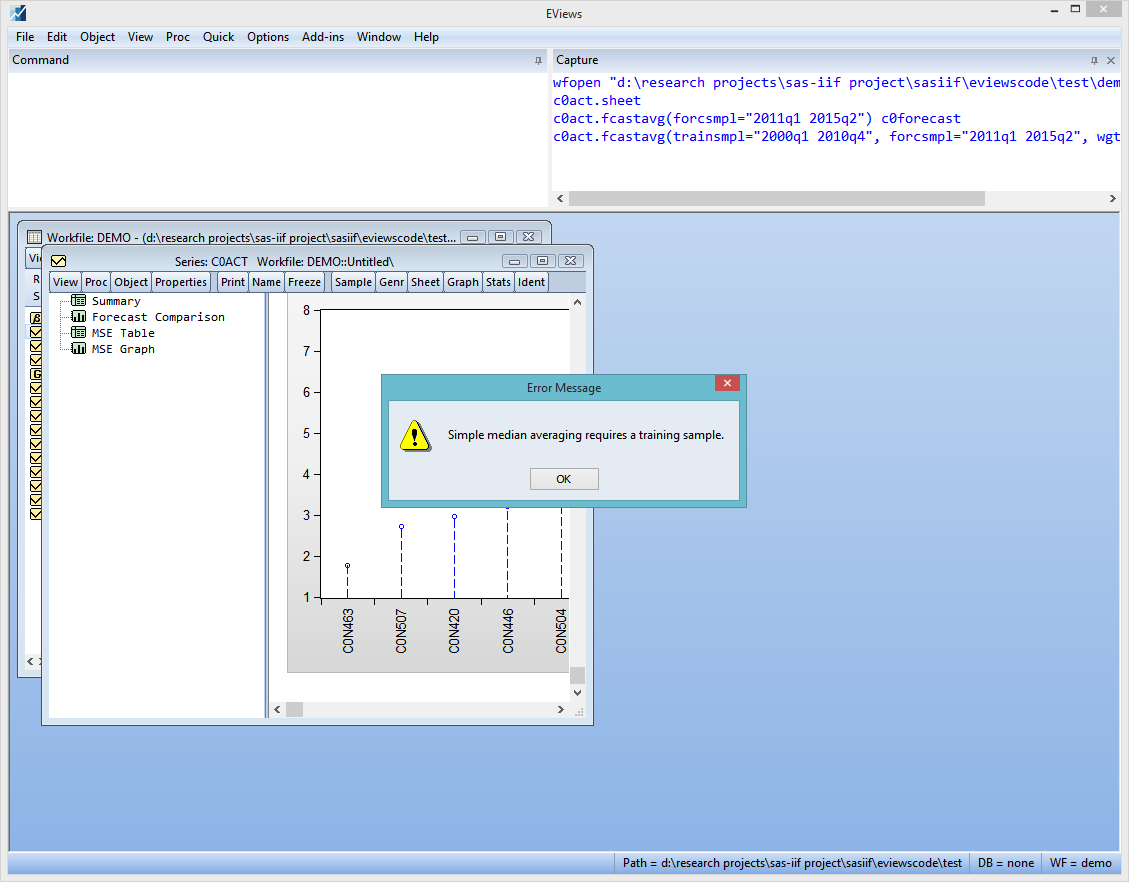
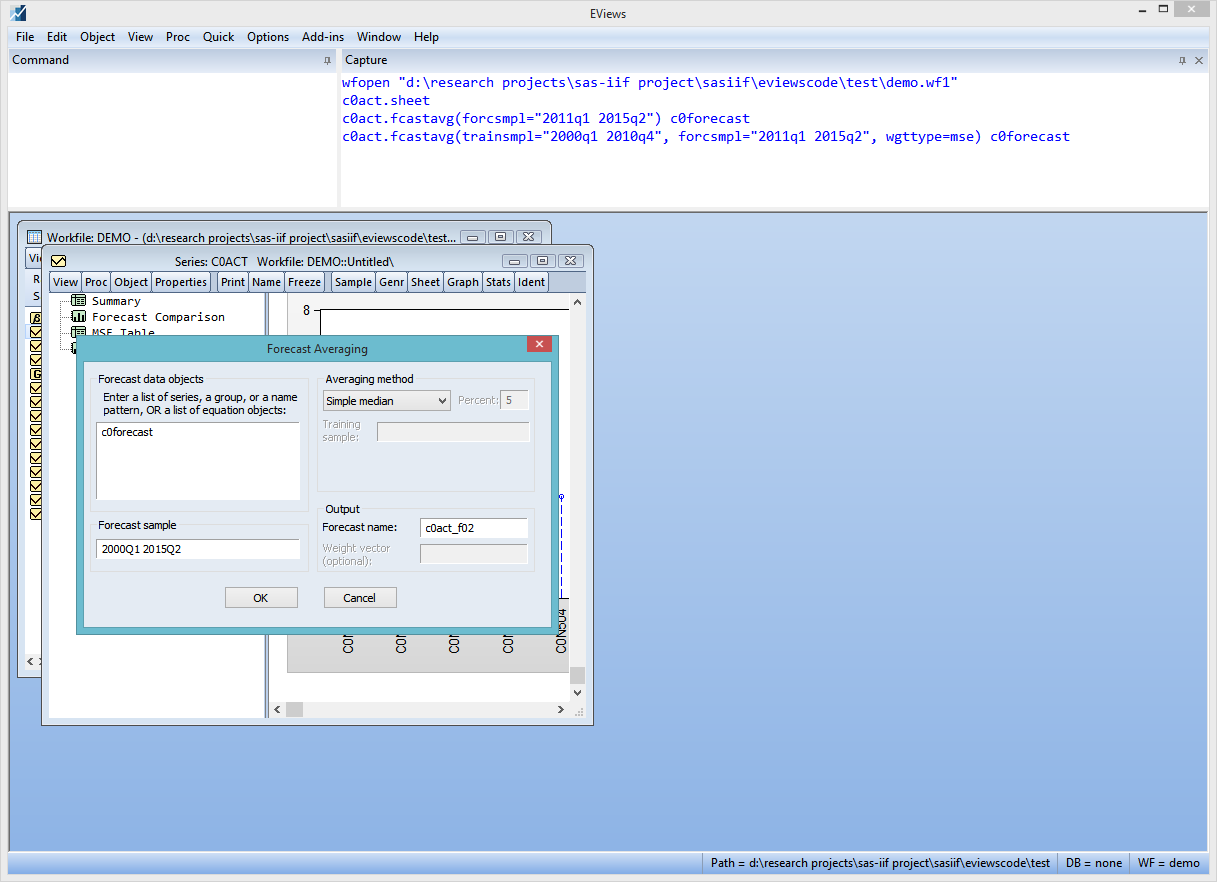
Pardon me since I'm really new to this feature. But when I tried the simple median method using the dialog box, I get the error saying that I need a training sample - but the text box for entering a training sample is disabled (greyed out). Please see the two screenshots - one showing the error message and the other showing the dialog box. I'm using the same data as in my previous post.
If I issue a command directly, and specify a trainsmpl, median seems to work fine. Even if my command is something like the following, where the training sample is for only one period and the forecast sample starts from that same period.
Code: Select all
c0act.fcastavg(trainsmpl="2000q1 2000q1", forcsmpl="2000q1 2015q2", name=c0act_med, wgttype=med) c0n420 c0n421 c0n426
Also, my understanding is that one set of weights is computed using the training sample and is used throughout the entire forecast sample - is this correct? If so, this means that in doing a real-time forecast combination exercise or a simulation exercise, I will have to loop over all the time periods in my forecast sample one-by-one? I'm not saying this is a bad thing. Just trying to see if I missed any easier way to do this. Since I'm trying to run some simulations that would each require a huge number of iterations, I want to avoid low efficiency code as much as possible. :)
- 2015-07-26 22_04_46-EViews.png (41.85 KiB) Viewed 6677 times
- 2015-07-26 22_06_47-EViews.png (45.3 KiB) Viewed 6677 times
Re: Somewhat strange behavior in forecast combination
Posted: Mon Jul 27, 2015 7:56 am
by EViews Gareth
Yes, it looks like the dialog is slightly out of whack. I'll see if we can improve it.
And, yes, you would have to roll the simulation.
Re: Somewhat strange behavior in forecast combination
Posted: Mon Jul 27, 2015 2:21 pm
by yzhao
Thank you for the quick response!
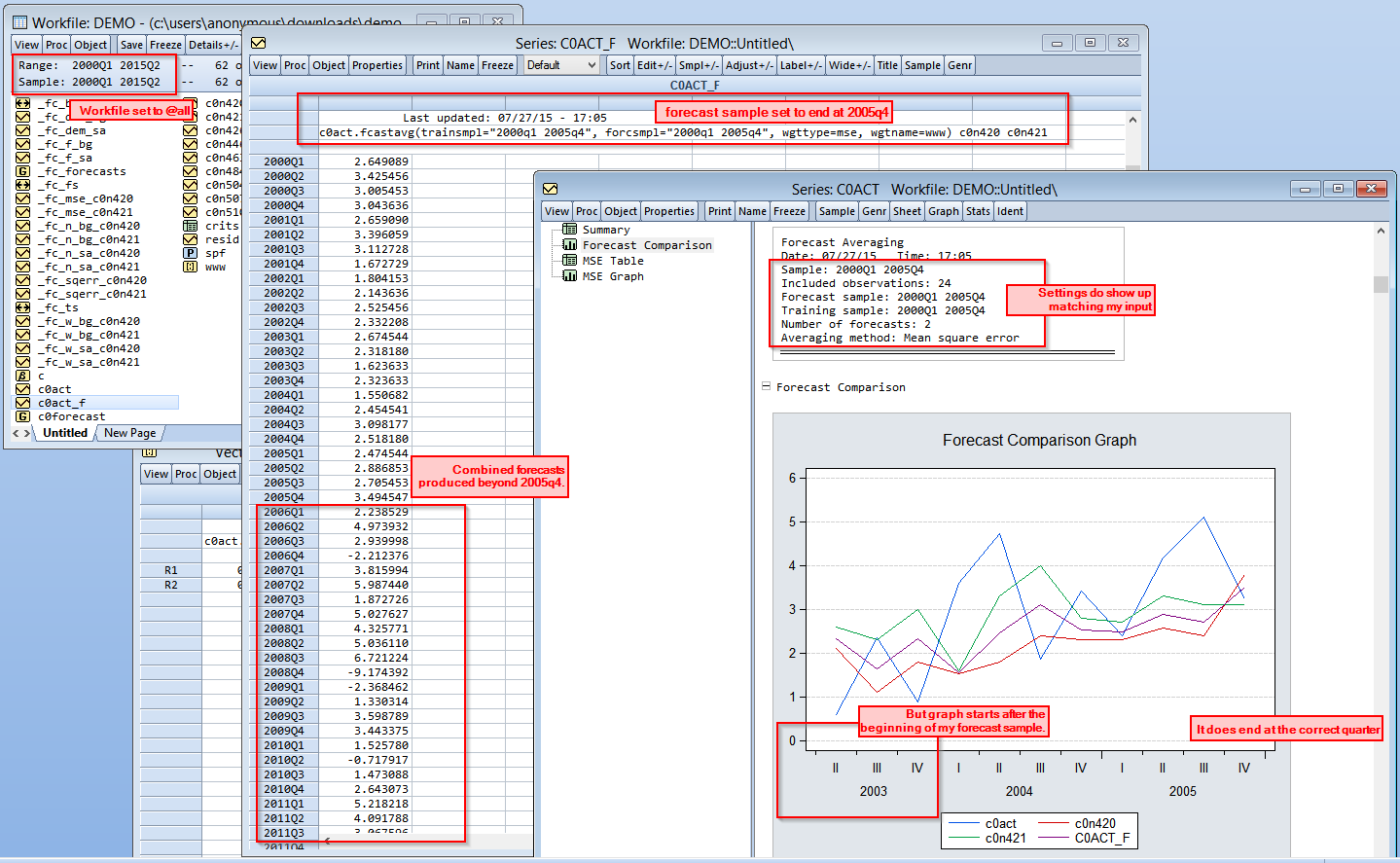
One other thing I noticed today: If I run the following command, trying to get only an in-sample combination by setting the forecast sample to equal training sample (I know it's kind of cheating...), I get combined forecasts beyond my forecast sample, but the forecast comparison graph showing only a subsample of my forecast sample. Please see the screenshot I attached. Still using the same data file.
Code: Select all
c0act.fcastavg(trainsmpl="2000q1 2005q4", forcsmpl="2000q1 2005q4", wgttype=mse, wgtname=www) c0n420 c0n421
- 2015-07-27 17_14_11-EViews.png (113.41 KiB) Viewed 6648 times
Re: Somewhat strange behavior in forecast combination
Posted: Mon Jul 27, 2015 2:30 pm
by EViews Gareth
Non-forecast period observations are set to actual. The observations post 2005 are not forecasts, but are actual values. In your case that is a little nonsensical, but in the general case where you have actuals prior to the forecast period (instead of after) it makes sense.
The forecast comparison graph starts at the end of the training sample minus 10 observations. (unless there is no training sample, in which case it starts at the start of the forecast period). In most cases that makes sense, because the training sample is before the forecast sample.
Re: Somewhat strange behavior in forecast combination
Posted: Mon Jul 27, 2015 2:37 pm
by yzhao
Now that you are saying it out loud, it actually makes a lot of sense... Somehow when I was looking at them I wasn't able to see a reason.

One minor suggestion: Is there anyway to easily match weights in the vector to the series names? It seems that weights in the vector is sorted, and is not in the order in which series names were supplied to the command.
Re: Somewhat strange behavior in forecast combination
Posted: Mon Jul 27, 2015 3:19 pm
by EViews Gareth
Could you give an example of that?
Code: Select all
c0act.fcastavg(trainsmpl="2000q1 2005q4", forcsmpl="2000q1 2005q4", wgttype=mse, wgtname=www) c0n420 c0n421
c0act.fcastavg(trainsmpl="2000q1 2005q4", forcsmpl="2000q1 2005q4", wgttype=mse, wgtname=ww2) c0n421 c0n420
show www
show ww2
Note the values in www and ww2. I believe the weights are in the order of the forecast series.
Re: Somewhat strange behavior in forecast combination
Posted: Mon Jul 27, 2015 7:07 pm
by yzhao
I tried your code and indeed elements in the two vectors are in opposite order.
But please see the attached screenshot. If I'm understanding the MSE table correctly, what the table gives are the in-sample MSEs, i.e., ones that are used to derive the weights. So, a larger MSE should mean a smaller weight. In the screenshot, c0n420 has the largest MSE, so it should have the smallest weight. c0n420 is the first variable in the list supplied to the command, and the first row of the ww3 vector is the largest. Wouldn't this mean that the weights are not in the order supplied to the command? Or am I confused at some point? I was wrong about the weights come sorted though - in this case with three variables rather than two, the weights are clearly not sorted.
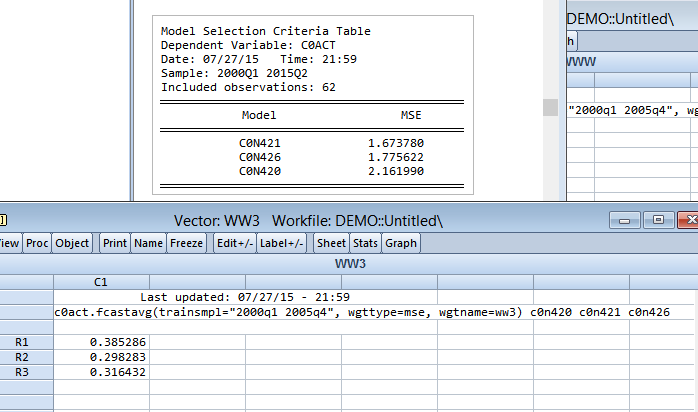
- 2015-07-27 22_00_48-EViews.png (22.09 KiB) Viewed 6617 times
Re: Somewhat strange behavior in forecast combination
Posted: Tue Jul 28, 2015 7:56 am
by EViews Gareth
Yep, we'll take a look.
Re: Somewhat strange behavior in forecast combination
Posted: Tue Jul 28, 2015 8:34 am
by yzhao
Thanks. :)
By the way, how can I make an equaloption optional and set a default value (like in many built-in procs)? Also, I thought you said that there is a way to show "secondary" dialog box depending on what users check in the "primary" dialog box. Do you mind telling me again?
Re: Somewhat strange behavior in forecast combination
Posted: Tue Jul 28, 2015 8:55 am
by EViews Gareth
Not sure I understand the first question.
Code: Select all
create u 10

%txt = "some text"


call diag1

subroutine diag1
	!ret = @uidialog("caption", "some dialog", "edit", %txt, "my edit", "button", "Advanced options")
	if !ret = 1 then
		call diag2
	endif
endsub

subroutine diag2
	!ret2 = @uidialog("caption", "some other dialog", "text", "add some stuff here")
	call diag1
endsub
Re: Somewhat strange behavior in forecast combination
Posted: Tue Jul 28, 2015 9:07 am
by yzhao
Thanks for the answer to the second question. I was being stupid with the first thing. I was in Stata mode and thought I must explicitly declare an option optional or mandatory...
Re: Somewhat strange behavior in forecast combination
Posted: Tue Jul 28, 2015 9:14 am
by EViews Gareth
I was in Stata mode
Our sympathies. Modern medicine is quite wonderful these day. Perhaps see a doctor?
Re: Somewhat strange behavior in forecast combination
Posted: Tue Jul 28, 2015 11:24 am
by EViews Glenn
yzhao -- Just ignore Gareth. We do. :D