Page 1 of 1
Saving multiple tables in one Excel file
Posted: Thu Jun 11, 2015 2:48 am
by EconStudentMaas
Hey everyone!
In order to create an aggregated table of several model specifications of an OLS regression I am working on, I am trying to save estimation output into Excel.
What I have done so far is the following:
freeze(eq09) eq09_emu --> eq09_emu is a table of regression output
eq09.save (t=xsl) emu
My question is the following: Since I have not only eq09_emu, but also eq01_emu, eq02_emu, ...
I am wondering whether there is some way that I can save these multiple tables into one single Excel file, so that I can work with it easier.
You might see that I am not experienced with programming ;-)
Thanks for your help!!!
Re: Saving multiple tables in one Excel file
Posted: Thu Jun 11, 2015 2:59 am
by EconStudentMaas
Short but important addition to my question :D
For my task, I basically have an equation and add a new independent variable in every step, adding 8 variables to the base specification in total. Right now I do that by estimating 9 separate equations and then copying the output into excel manually to build one single table. The table has the following format:
1. column with variable names
then 1 column for each model, with the corresponding coefficient for each variable.
Here is a random picture from google, hopefully showing what I mean
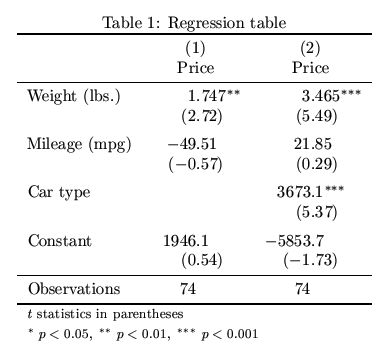
If anyone has some magical trick or code through which EViews would do that for me, I would be forever thankful :D
Re: Saving multiple tables in one Excel file
Posted: Thu Jun 11, 2015 4:32 am
by EViews Gareth
Take a look at the EqTabs add-in.
http://www.eviews.com/Addins/addins.shtml
You might find it does what you want, and if it doesn't, taking a look at the source code will probably point you in the right direction for writing your own.
Re: Saving multiple tables in one Excel file
Posted: Thu Jun 11, 2015 5:22 am
by EconStudentMaas
That is genius! Thank you so much Gareth!!!
Is there any way to (I) change the order in which the independent variables appear, (ii) show asterisks for significance right behind the coefficients, so without displaying SE or t, and (iii) change the significance levels corresponding to the asterisks?
In any way, I can also quickly adjust those thinks in Excel.
Thanks again, you saved me a horrendous amount of time!
Re: Saving multiple tables in one Excel file
Posted: Thu Jun 11, 2015 6:14 am
by EViews Gareth
You can modify the eqtabs source code to do that, I'm sure.
Re: Saving multiple tables in one Excel file
Posted: Thu Jun 11, 2015 7:55 am
by EconStudentMaas
I'm sorry Gareth, but where can I find the source code? Again, not much programming/coding experience here :?
Re: Saving multiple tables in one Excel file
Posted: Thu Jun 11, 2015 9:00 am
by EViews Gareth
File->Open->Program in Add-ins Folder.