Page 4 of 9
Re: Basic Rolling Regression
Posted: Wed Sep 12, 2012 8:34 am
by EViews Esther
You can make a storage vector/matrix before doing the loop (e.g. vector(!nrolls) RMSE) and store RMSE values in the loop.
Re: Basic Rolling Regression
Posted: Wed Sep 12, 2012 12:40 pm
by doudou
Thanks again Esther!
When I try to change the equation with more variables, I think the error means I need to change the number after the coefs in the sentence below, but I am not sure how many I shud put there to replace the "!"? or should not to replace it but add sth else?
Please see screen shot!
Thanks
Code: Select all
   ' estimate equation - where the equation is P =c(1) + c(2)naturalgas +c(3)coal+c(4)wool+c(5)qcmid
              eq1.ls usdaud c naturalgas coal wool qcmid

             ' store coefficients
              colplace(coefmat,eq1.@coefs,!j)
Re: Basic Rolling Regression
Posted: Wed Sep 12, 2012 1:18 pm
by EViews Esther
This is because the storage matrix was set to be 2-by-!nrolls. Now the number of coefficients is 5 so that we need to change the storage matrix size.
Re: Basic Rolling Regression
Posted: Thu Sep 13, 2012 7:30 am
by doudou
Code: Select all
   ' estimate equation - where the equation is P =c(1) + c(2)naturalgas +c(3)coal+c(4)wool+c(5)qcmid
              eq1.ls usdaud c naturalgas coal wool qcmid

             ' store coefficients
              colplace(coefmat,eq1.@coefs,5x5j)
Hi Esther,
Please see if I can change the "!" to "5x5"? or please could you let me know how should I amend this?
Many thanks!
Re: Basic Rolling Regression
Posted: Mon Oct 01, 2012 12:34 am
by relaxdave
Thank you for this thread! It is so much easier to get into rolling regression and forecasting by examples.
It works fine, but if i log my dependent variable, i get the error message: "Overflow in "DO_EQ1.Forecast(F=NA) yf".
The forecast for the last period (doing 1 step forecasts) misses. But as far as i can see the results are correct.
Re: Basic Rolling Regression
Posted: Mon Oct 01, 2012 6:32 am
by relaxdave
The difference between start (%1pers) and end (%1pere) points should be 1 so that you can write the program as follows:
Code: Select all
' 1-period-ahead forecast
%1pers = @otod(@dtoo(%start)+!i+!window-1) 'start point
%1pere = @otod(@dtoo(%start)+!i+!window) 'end point
Hi Esther,
is this really a one-period-ahead forecast?
if i continue the row you mentioned before, this should be a 2-period ahead forecast, and thats what i get if i compute the forecasts.
4-period end point: %4pere - %4pers +1 = 4 --> 2 - (-1) + 1 = 4
3-period end point: %3pere - %3pers +1 = 3 --> 1 - (-1) + 1 = 3
2-period end point: %2pere - %2pers +1 = 2 --> 0 - (-1) + 1 = 2
1-period end point: %1pere - %1pers +1 = 1 --> -1 - (-1) + 1 = 1
If i compute it manually I get the same results.
I have got another question regarding exogenous variables: How can I tell Eviews that it should include (out of fit sample) exogenous variables into the forecasts and exclude endogenous variable values (use estimated values instead) ? Is this what "(f=arg) does?
Does anybody have a solution for the log problem from above?
Re: Basic Rolling Regression
Posted: Fri Nov 02, 2012 11:53 pm
by dauz_ve
Code: Select all
   ' set sample for estimation period
   %first = @otod(@dtoo(%start)+!i-1)
   %last = @otod(@dtoo(%start)+!i+!window-2)
   smpl {%first} {%last}

   ' estimate equation - where the equation is P =c(1) + c(2)*P1(-1)
   eq1.ls usdaud c usoil

   ' store coefficients
   colplace(coefmat,eq1.@coefs,!j)


d(noerr) yf
Hello, Eviews staff. I was trying to make a rolling regression for estimating the coefficients of an Ar(1) process, trying to reproduce the programming of Esther, but i can't seem to pull it off. Here is the quote of the line of code that doesn't seem to work for me. Specifically, my Eviews says that "smpl {%first} {%last}" are invalid dates, and i don't really know what to do about it. Please help me! Thank you in advance.
PS: I may have managed to screw it up in more ways than here, but this is the only line that stops me due to an error warning. Im terribly lost and due time for my disertation is running fast! please help me!
Re: Basic Rolling Regression
Posted: Fri Oct 18, 2013 11:39 pm
by Nazirul_Monash
Hi
I ran Rolling Reg add-in in EViews 8 and rand into this error:
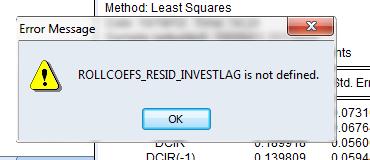
- roll not defined.jpg (12.63 KiB) Viewed 470955 times
I thought maybe it couldn't handle parentheses or other signs but when I took those non-letter symbols away, it only fix it with for variables. So, I'm not sure what the problem is now.
Help would be greatly appreciated. Thank you.
Have a nice day.
Re: Basic Rolling Regression
Posted: Fri Nov 22, 2013 12:21 am
by lscx411
I run the 4-period-ahead program and only change the number of variables to 4. My sample is from 1996M01 to 2013M09, then it comes out a window says :2013M09 is an illegal or reserved name in "IF 2013M09<1997M12 THEN". Could anyone help me to solve this problem! Many thanks!
Re: Basic Rolling Regression
Posted: Sat Nov 23, 2013 11:50 am
by EViews Gareth
What structure is your workfile?
Re: Basic Rolling Regression
Posted: Mon Nov 25, 2013 8:09 pm
by lscx411
I run the 4-period-ahead program and only change the number of variables to 4. My sample is from 1996M01 to 2013M09, then it comes out a window says :2013M09 is an illegal or reserved name in "IF 2013M09<1997M12 THEN". This is my code following previous post. Would you help check the problem? Thanks! :D
Code: Select all
'run rolling regression

' set window size
!window = 20

' set step size
!step = 1

' get size of workfile
!length = @obsrange

' declare equation for estimation
equation eq1

'calculate number of rolls
!nrolls = @floor((!length-!window)/!step)

'matrix to store coefficient estimates
matrix(4,!nrolls) coefmat ' where 4 is the number of coefficients

'series to store forecast estimates
series fcast

'redundant series for catching start and end points
series ser = 1
%start = @otod(@ifirst(ser))
%end = @otod(@ilast(ser))

'variable keeping track of how many rolls we've done
!j=0

' move sample !step obs at a time
for !i = 1  to  !length-!window+1-!step step !step
   !j=!j+1

   ' set sample for estimation period
   %first = @otod(@dtoo(%start)+!i-1)
   %last = @otod(@dtoo(%start)+!i+!window-2)
   smpl {%first} {%last}

   ' estimate equation - where the equation is y=c(1)+c(2)*x1+c(3)*x2+c(4)*x3
   eq1.ls lqt c idt ygdt pidt

   ' store coefficients
   colplace(coefmat,eq1.@coefs,!j)

   ' 4-period-ahead forecast
   %4pers = @otod(@dtoo(%start)+!i+!window-1)      'start point
   %4pere = @otod(@dtoo(%start)+!i+!window+2)   'end point: %4pere - %4pers +1 = 4
   if {%end} < {%4pere} then   'check whether the forecast end point is greater than the workfile end point
      return
   endif

   ' set smpl for forecasting period
   smpl {%4pers} {%4pere}

   ' forecast with command *forecast* (see also *fit*)
   eq1.forecast(f=na) yf

   ' set sampl to obtain the 4th period observation
   smpl {%4pere} {%4pere}

   ' store forecasts
   fcast = yf
next

smpl @all
show coefmat
show fcast.line

d(noerr) ser
Re: Basic Rolling Regression
Posted: Mon Nov 25, 2013 8:33 pm
by lscx411
I do the rolling regression by the following code and it works well. But a problem is that the report equation is the last coeffecient matrix. For example, my sample is from 1996M01-2013M09, then the report equation is from 2008M12-2013M01. See below. Can I use the coeffecient from the report equation or should I use an average coeffecient from the reported 'coefmat'. Or the code could be changed a little to report an average coeffecient matrix and other statistics. Thanks for your time!

Code: Select all
'run rolling regression

' set window size
!window =50

' set step size
!step =5

' get size of workfile
!length = @obsrange

' declare equation for estimation
equation eq1

'calculate number of rolls
!nrolls = @round((!length-!window)/!step)

'matrix to store coefficient estimates
matrix(4,!nrolls)  coefmat ' where 4 is the number of coefficients

'variable keeping track of how many rolls we've done
!j=0

' move sample !step obs at a time
for !i = 1  to  !length-!window+1-!step step !step
   !j=!j+1

   ' set sample to estimation period
   smpl @first+!i-1 @first+!i+!window-2

   ' estimate equation - where the equation is y=c(1)+ c(2)*x1 + c(3)*x2+c(4)*x3
   eq1.ls lqt c idt ygdt pidt

   'store coefficients
   colplace(coefmat,eq1.@coefs,!j)
next

show coefmat
Re: Basic Rolling Regression
Posted: Mon Nov 25, 2013 10:20 pm
by EViews Gareth
What do you want to use?
Re: Basic Rolling Regression
Posted: Tue Nov 26, 2013 3:51 am
by lscx411
What do you want to use?
oh i get it. the different coeffecients can be graphed in a figure.Is that right?
Re: Basic Rolling Regression
Posted: Tue Nov 26, 2013 4:00 am
by lscx411
What do you want to use?
I want to report each coeffecient matrix and its statistics under each sub-sample.