Page 2 of 2

Re: Using import/wfopen instead of read

Posted: Tue Aug 14, 2018 6:20 am
by EViews Gareth
Yes, it does.

Re: Using import/wfopen instead of read

Posted: Wed Aug 15, 2018 2:04 am
by farrel
Yes, it does.
I found that Eviews works with opened Excel only if I switch on "Share Workbook" in excel options (.xlsx).
Is this the way how do you enable Eviews to work with opened excel?

Re: Using import/wfopen instead of read

Posted: Mon May 10, 2021 12:07 am
by farrel
Dear Gareth,

I would like to return to the topic on loading data fom Excel.
I need the feature to download the data from Excel, when Excel is open. From you previous posts I understand that it should be possible...
However, I get the error "Sharing violation for file ..."
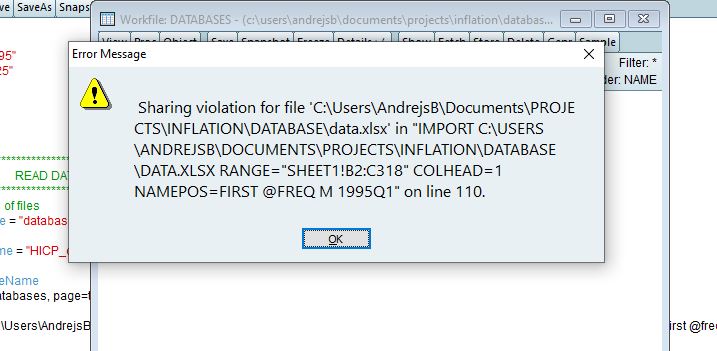
pic1.JPG
pic1.JPG (52.54 KiB) Viewed 11934 times
I have tested various ways - i) xls vs xlsx; ii) import vs wfopen. Nothing works, unless I close Excel file.

Shall I configure Excel in some specific way? in order to be able to read data from an opened Excel ... or maybe I need to force Eviews somehow to "intrude" Excel?

N.B. I can partly overcome the problem by using "shared workbook" feature enabled, but this is not a solution currently, since under this feature Excel restricts various features in it (e.g. not possible to make charts..)

Andrejs

Re: Using import/wfopen instead of read

Posted: Mon May 10, 2021 8:55 am
by EViews Steve
Are you running EViews on the same machine as Excel? Importing a file that is already open in Excel only works if EViews can talk to Excel directly and that usually means they both have to be running on the same machine.

Otherwise, you'll have to close the file or open it in shared mode like you already discovered.

Re: Using import/wfopen instead of read

Posted: Mon May 10, 2021 11:33 pm
by farrel
in my case, Eviews doesn't read opened Excel even running on the same computer...
Thanks for this point anyway. My acute need actually was running Eviews and Excel on different machines.